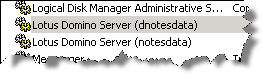
 Under some circumstances, the installer leaves an additional service in the list of available windows services.
How can you delete this obsolete service? In Notes/Domino 4.x, there was an executable called ntsvinst.exe that was installed by default in the program directory of the server. This allowed the server to be set up easily as a service. This executable was removed in R5, but has been re-added in Domino 6.x. an is also available in Domino 8.0.2.
To uninstall the obsolete Domino service:
1. Click on Start -> Settings -> Control Panel. Double-click Administrative Tools and then double-click on Services.
2. Find Domino in the list of services. By default it will be “Lotus Domino Server (lotusdominodata)”.
3. Open a Command Prompt window by selecting Start -> Run, type cmd, and press Enter.
4. Go to the Domino program directory.
5. Issue the following command:
ntsvinst -d -t”Lotus Domino Server (lotusdominodata)”
Note: There is no space between -t and the first quotation mark. The service name between the quotes is not case sensitive.
6. Refresh the Services window to confirm the service is no longer listed.