@Formula Magic

How often have you created views to return a concatenated value as a result of a @DBLookup? You normally create a new column and add something like this as a column value:

fieldname1 +"~"+ fieldname2 + ...

The complexity of this formula increases with the number of items you like to concatenate.
And it gets even more complex if you want to build a view to return all items of a document ( except a few ) as JSON style data.

Then you would have to write a formula similar to this:

"{ \"" + "count\" :" + @Text(count) + " \"" + "Author\" :" + Author + ... +"\}"

A little @formula magic can make this work much easier

Simply put this formula snippet into a view column.

_exclude:="$FILE":"$Fonts":"Form":"$UpdatedBy":"$Revisions";
_fld:=@Trim(@ReplaceSubstring(@DocFields;_exclude;@Nothing));

"{"
+ @Implode (
@Transform (
_fld; "_fn" ; "\"" + _fn + "\":\"" + @Text ( @GetField ( _fn) ) + "\"" ) ; "," ) +
"}"

@DocFields gets all fields of the underlying document and @Transform and @Implode concatenate the fieldnames and according values. The result looks like this:

{
"fieldname1": "value",
"fieldname2": "value",
"fieldname3": "value",
...
}

Now you can use this view column as a JSON datasource …


XPages FloatingPane Custom Control

I have just ( almost ) finished a new control to submit for the OpenNTF Development Contest.

It’s a floating pane control. The control is similar to Ferry Kranenburgs control. The difference is that my control does not use any 3rd party libraries like jQuery. The control is fully built with dojo.

I need to write the documentation and wrap all stuff into a zip. I expect that the control will be available during the weekend.

As a teaser, I have produced a short video showing the control in action.

Don’t throw any stuff at me; it’s my first videoproduction


Holiday, a new job and upcoming conferences

It has been a bit quiet here for the past few weeks. So here is a wrapup of what has happened.

After my wife and I didn’t went on holiday in 2010 due to my wife’s lung desease, we spent almost 3 weeks in Side, Turkey this year. Although I booked the wrong hotel, it turned out that this hotel was a better choice than the hotel I had in mind when booking. It was a fantastic holiday to free my mind with a lot of sun (sunburn included), swimming, diving and other activities.

Many of you already know that I no longer work for WITTE Velbert. I had my last day at June, 8th. I started a new job on July, 1st.

I am now a fulltime XPages developer. I’m working for is@web, a company located in Nuremberg, Germany.

The decision to change the employer was already made in january 2011 when my friend Werner Motzet asked me to join the company. We had a telephone conference with CEO Jens Dinstühler and during this conference we agreed to meet a few days later in Nuremberg to discuss the contract details.

On January, 13th, I took a red-eye to Nuremberg and at the end of the day I signged the contract.

Although the company is located in Nuremberg, I am working in an office in Ratingen near Düsseldorf. I am the only employee in this office at the moment, but it is planned to increase the number of employees soon.

I am working on a Business Application Suite ( COIS V2 ). The application is completely based on XPages technology and used internally in the first place. It is intended to sell parts of the suite ( or the whole suite ) as soon as the application went to the internal quality assurance process and becomes gold release. More details to follow …

Let’s talk about upcoming conferences. Due to the job change, I’m not sure if I will/ can attend AdminCamp 2011 in Gelsenkirchen this year. In November I will talk at the DNUG conference in Bamberg.

Per Henrik Lausten invited me to give a session at the DanNotes conference in Danmark. I have confirmed the invite and looking forward to attending DanNotes.


Get custom properties from another custom control

Here is a quick tipp that can make your work with custom controls easier.

Each custom contConrol can have a set of customproperties that are accessible vie compositeData.PropertyName. But also each custom control has it’s own propertyMap. This makes it impossible to access a custom property from ccParent by ccChild.

I have put together a small piece of JS that let you access the custom properties.

function getParentProperty(_this, parentProp){
var parentID = getComponent(getComponent(_this.getId()).getParent().getId()).getParent().getId();
if(null != parentID) {
var parentComponent = getComponent(parentID);
var parentProperties = parentComponent.getPropertyMap();
if(null != parentProperties) {
var ret = parentProperties.getProperty(parentProp);
}
}
return (null != ret)? ret:null;
}

Download sample database


Using MySQL Data in XPages

In todays world, data is not stored in a single place but in different systems and on different platforms. On possibility is a SQL database. Assume, you want to access this data and use it in your XPages application.

I have created a new project and contributed the code on OpenNTF.

The javascript lib contains a single function “getSQLData()” that establishes the connection and retrieves the data acording to the connection parameters and SQL statement you provide.

The resultset can then be used in a XPages DataTable control. Simply bind the control to the “getSQLData()” function. This also works in a repeat control or a combo box.

Use “Select * from people” to retrieve all columns in the table; you can also use “Select FIRSTNAME, LASTNAME from people” to return only specific values.

Here is some sample code for custom control containing a DataTable using the result from an SQL statement as source.

<?xml version="1.0" encoding="UTF-8"?>
<xp:view xmlns:xp="http://www.ibm.com/xsp/core">
<xp:this.resources>
<xp:script src="/ssMysql.jss" clientSide="false" />
</xp:this.resources>
<xp:dataTable id="dataTable1" rows="30"
value="#{javascript:getSQLData();}" var="rs">
<xp:column id="column1">
<xp:this.facets>
<xp:span xp:key="header" style="font-weight:bold">FirstName</xp:span>
</xp:this.facets>
<xp:text escape="true" id="firstname">
<xp:this.value><![CDATA[#{javascript:rs[1]}]]></xp:this.value>
</xp:text>
</xp:column>
<xp:column id="column2">
<xp:this.facets>
<xp:span xp:key="header" style="font-weight:bold">LastName</xp:span>
</xp:this.facets>
<xp:text escape="true" id="lastname">
<xp:this.value><![CDATA[#{javascript:rs[2]}]]></xp:this.value>
</xp:text>
</xp:column>
<xp:column id="column3">
<xp:this.facets>
<xp:span xp:key="header" style="font-weight:bold">
Country
</xp:span>
</xp:this.facets>
<xp:text escape="true" id="computedField1">
<xp:this.value><![CDATA[#{javascript:rs[3]}]]></xp:this.value>
</xp:text>
</xp:column>
<xp:column id="column4">
<xp:this.facets>
<xp:span xp:key="header" style="font-weight:bold">Age</xp:span>
</xp:this.facets>
<xp:text escape="true" id="computedField2">
<xp:this.value><![CDATA[#{javascript:rs[4]}]]></xp:this.value>
</xp:text>
</xp:column>
</xp:dataTable>

</xp:view>

And here is the code for the XPage

<?xml version="1.0" encoding="UTF-8"?>
<xp:view xmlns:xp="http://www.ibm.com/xsp/core" xmlns:xc="http://www.ibm.com/xsp/custom">
<xc:ccSQLViewSample SQLQuery="Select * from people">
<xc:this.connection>
<xc:connection port="3306" db="xtest" password="password"
server="localhost" username="root" />
</xc:this.connection>
</xc:ccSQLViewSample>
</xp:view>

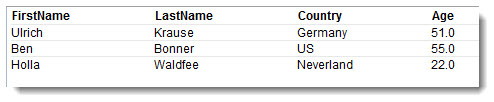
And finally here is the output in the browser

If you want to access data from a DB2 datasource instead of MySQL, simply use the appropriate driver.