Domino Designer – Initially Collapse Comments

If you write tons of code in Java and Javascript, you probably have a huge number of comments in your code. If not, stop reading and review your code …

Sometimes it is a bit annoying when you scroll thru your code looking for a certain piece of code and you also have to scroll thru all the comments. here is a quick tipp that can make your life earsier.

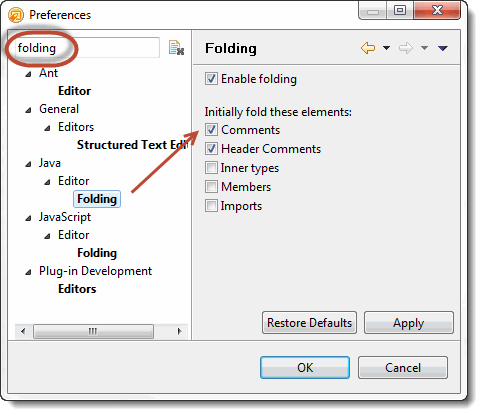
Open the preferences dialog in Domino Designer and search for “Folding” There are two sections for Java and Javascript, where you can configure if comments should be initially collapsed.


Weird issue resulting in application getting corrupt

I had a very bad start into this week. On last week friday, I made some changes to our CRM project. The changes were mostly some modifications to a variable resolver. I removed redundant code by moving some parts of the code to methods within the resolver code. I also added two new methods to an existing bean. All this is far away from rocket science. I then changed the home.xsp to use the new methods from the bean.

After opening the application in the browser, everything looked fine. I refreshed the application in the browser and … BOOOOOOOMMMMMMMMM.

Last thing, I could see on the server console was

err_protected> ERR_PROTECTED ERROR: D:\Programme\IBM\Lotus\Domino\data [nsfsem2.c/ln 1684]

then the server crashed. I restarted the server and tired again. Same result. Application could be opened and crashed after any other action. To be sure, I removed my modifications. But the server still crashed. I tried everything from compact, fixup , replacing the design with the design of a working copy and even creating a new copy of the application. But nothing helped. The error persists.

The strange thing is, that I could/can open the application in question in Designer and make changes, add, update and delete data documents. The crash only occurs, when working in the browser.

I then replaced the corrupt file with the working copy and everything worked as expected. We made some other modifications to the design and the application stayed stable. Before driving home, I made a copy and put the file onto my Domino at home. As expected, everything was fine.

I then started to implement the same modifications that ended in the file becoming corrupt. And yes, I was able to reproduce the issue.

Phil Riand asked me to send in any crash report and the code that caused the error. I sent him an email yesterday morning. During the night, Phil sent a reply. here is wahat he wrote:

Hey Ulrich,

…. The issue you mention is definitively down in the NSF layer, in the semaphore management code. So I forwarded that to the appropriate team internally, and hope to get feedback soon. The issue might not even happen because of your database, and probably not because of your changes.

This is good news and bad news. Good news because there is something wrong, and it is reproducable. Bad news because if it is not in the database nor in the changes, it can happen again any time. So I hope, that IBM will find the cause and fix it.


XPages – Print RichText to PDF

With iText it is fairly easy to create PDF documents from Notes Documents in the browser. I have already written an article on how to do this.

Today I would like to share a small piece of code that lets you convert NotesRichText into PDF.

The download contains all the neccessary elements.

If you want to use the code in your own application, make sure that the “Store content as HTML and Mime” is checked for your RTItem.

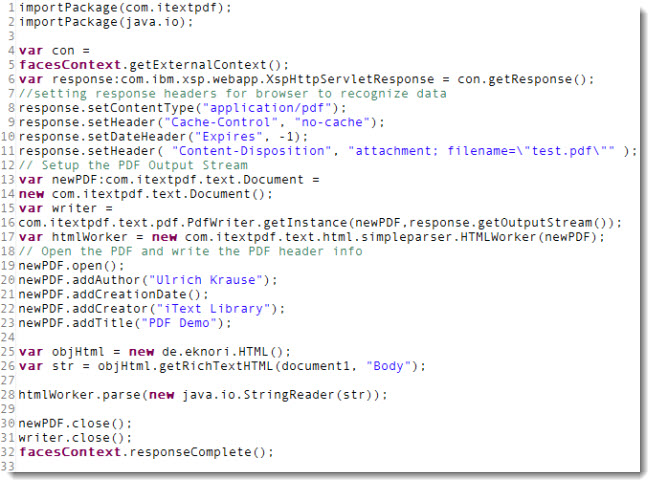
“Create PDF” – Button code:

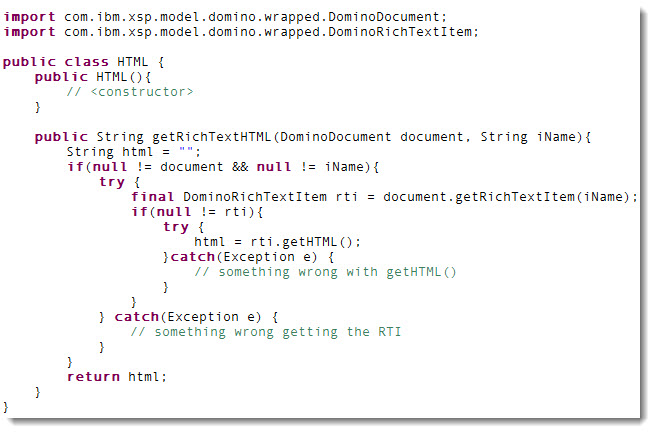
de.eknori.HTML code:

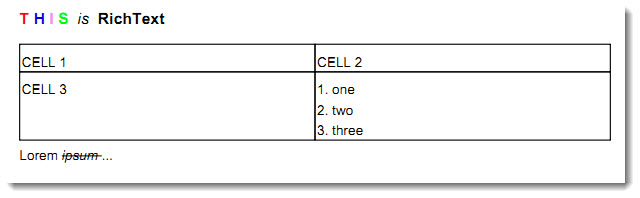
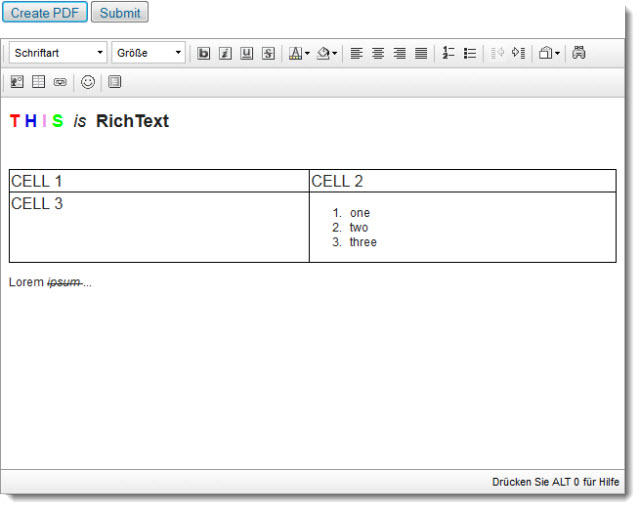
The result:

It’s not perfect. Embedded images do not work and aslo some styles do not convert well. This does not mean that it is impossible, but you have to write a few extra lines of code to make it work.


Domino Designer Performance – Check your AV

Ok, here is the story. My team and I had a very bad day yesterday. We were not able to work on our project because Domino Designer decided to take more than an hour for the build process. I tried to find out, what was wrong. My other team members in the head office did not reported this issue. So I had a weird network issue in mind bacause the issue occurred on all machines in the brnch office but was not able to find out any hint, what caused Designer to obviously wait for some action to complete when building the project. Even changing the code in a Java class was not possible. Each keyboard action took some seconds up to minutes to reflect the changes.

We are all working on local replicas of the files. And, it worked the day before … So WE did not change anything on the machine. Aside from this, we, the developers do not have proper rights to change ANYTHING on the machine. The is done by our friends, THE ADMINS.

Today, I saw a message when starting my computer that the Sophos AV has been successfully updated some files. Never seen that before … I decided to take also AV in consideration and looked into the settings. And there it was. “SCAN ALL FILES” and “SCAN IN ALL DIRS”. Exclusions? Well …. NO.  I managed to tweak the settings to exclude the Notes dir. And, what do you think? Right, everything now works at full speed again.

Shall I say “Thank you, admins” ?


Getting ‘JDBC driver not found error’ while trying to connect DOMSQL from crystal through jdbc

I could do with some help as i’m pretty well stuck.

I’m trying to connect crystal report 11.5 ( XI R2 )  developer to DOMSQL on a remote server via jdbc.

I have copied com.ibm.domino.domsql.driver_1.0.0.jar into “C:\Program Files\Common Files\Business Objects\3.0\java\lib\external”

I then opened the CRConfig.xml in “C:\Program Files\Common Files\Business Objects\3.0\java\lib” and added “C:\Program Files\Common Files\Business Objects\3.0\java/lib/external/com.ibm.domino.domsql.driver_1.0.0.jar;” after the last semicolon just before ${CLASSPATH}

I then open Crystal reports, standerd report wizard, create new connection, JDBC (JNDI), I then enter my DB URL: “jdbc:domsql://serv01/cois_v2/cois_crm.nsf/crm” and driver class “com.ibm.domino.domsql.DomSQLDriver”.

Then next, username and password. When I try to connect, I get the error:

Failed to Open Connection
Details: JDBC Driver not found

Any idea? I think I’ve done everything right

 UPDATE: The problem is in the JDK that is installed with CR.  I have installed an updated version of the Java JDK (c:\jdk) and changed the path for JavaDir in CRConfig.xml. Now I am able to connect to the DomSQL server

UPDATE 2: I have also successfully tested with JRE instead of JDK. here is the exact version, I used

java version “1.6.0_24”
Java(TM) SE Runtime Environment (build 1.6.0_24-b07)
Java HotSpot(TM) 64-Bit Server VM (build 19.1-b02, mixed mode)


What I was working on recently

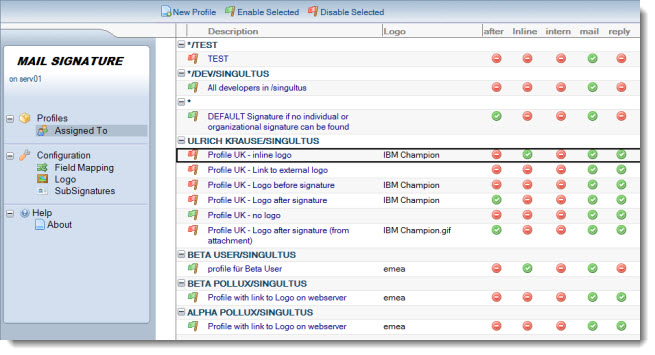
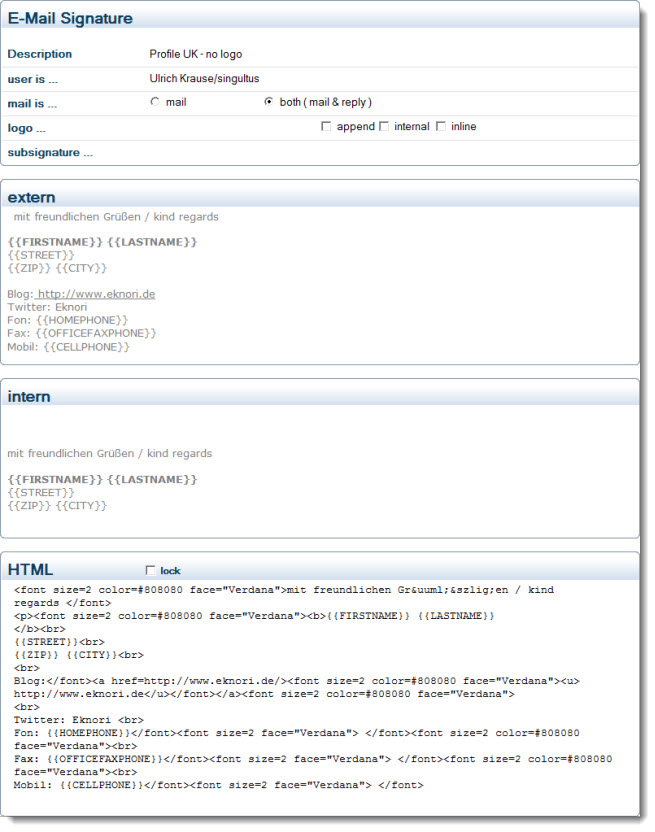
Aside from doing a lot of XPages development, I recently worked on a tool to add mail signatures. The aim was to provide a solution that adds the signatures on a server to avoid to push information to the profile in the users mailfile.
Using a server based solution also makes sure that the signature will be added to any kind of outgoing mails, regardless if it is send from the Notes Client, WebMail or a mobile device.

A signature configuration can be used for an individual user ( or group of users ), a department ( */dev/emea/us ) or fo all users in the company. Within the signature configuration you can use placeholders that are filled at runtime. You can also use a log0, that can be prepended or appended to the signature. You can also use the logo anywhere inside your signature using a {{LOGO}} tag.

This gives you a high grade of flexibility creating the signature.


There can be another signature that is used when sending mails internally.

Signatures are designed using a RichText item; the content is then “translated” to HTML. If you are familiar with HTML/CSS, you can create and style your signature in the HTML item directly.

The tool runs on Windows 2003/2008 32/64bit and Linux ( tested with SLES 11/32Bit )