Get DAOS ObjectCount and Size with LotusScript
At AdminCamp last week, I talked about how to get the count of all files in the DAOS repository and it’s overall size using some batch programming in Windows and LINUX.
As an alternative I proposed to use the console command “show dir -xml” to return an xml representation of the properties of all applications in the Domino data directory.
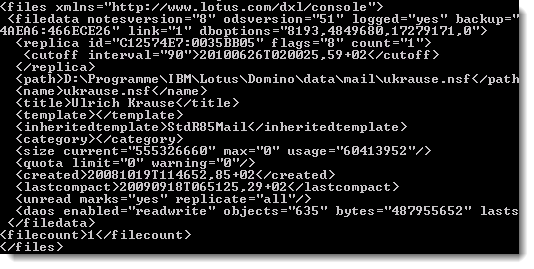
I found some code by Julian Robichaux that does the parsing of the XML structure. I’ve stripped out the relevant code snippets and put together a script lib to get the DAOS Object count and the overall size of all DAOS Objects.
The code writes a summary of these values to a database. You can use this data to create nice looking charts and graphs.
Here is the code:
%REM
	Library DAOS.Objects
	Created Sep 27, 2010 by Ulrich Krause/singultus
	Description: Comments for Library
%END REM
Option Public
Option Declare

Class DbInfoHolder
	Public PropertyList List As String
	Private xh As XmlHelper
	Private tNode As NotesDOMNode

	Public Sub New ()
		Set xh = New XmlHelper()
	End Sub

	Public Sub GetDbInfo (node As NotesDOMNode)
		Erase PropertyList
		On Error Resume Next
		PropertyList("Title") = xh.getNodeText(xh.findFirstChildNode(node, "title"))
		Set tNode = xh.findFirstChildNode(node, "daos")
		PropertyList("DAOSEnabled") = xh.getAttributeText(tNode, "enabled")
		PropertyList("DAOSObjects") = xh.getAttributeText(tNode, "objects")
		PropertyList("DAOSBytes") = xh.getAttributeText(tNode, "bytes")
	End Sub

End Class

Class XmlHelper
	Function getNodeText (node As NotesDOMNode) As String
		'** get the text of the given node
		Dim child As NotesDOMNode
		Dim childText As String

		If (node Is Nothing) Then
			Exit Function
		Elseif (node.IsNull) Then
			Exit Function
		End If

		Set child = node.FirstChild
		Do Until (child.IsNull)
			If (child.NodeType = DOMNODETYPE_TEXT_NODE) Then
				childText = childText + child.NodeValue
			Elseif (child.NodeType = DOMNODETYPE_CDATASECTION_NODE) Then
				childText = childText + child.NodeValue
			End If
			Set child = child.NextSibling
		Loop

		getNodeText = childText
	End Function

	Function getAttributeText (node As NotesDOMNode, attrName As String) As String
		'** get the text of a given attribute
		Dim attrList As NotesDOMNamedNodeMap
		Dim attr As NotesDOMNode
		Dim attrValue As String
		Dim i As Integer

		If (node Is Nothing) Then
			Exit Function
		Elseif (node.IsNull) Then
			Exit Function
		End If

		Set attrList = node.Attributes

		For i = 1 To attrList.NumberOfEntries
			Set attr = attrList.GetItem(i)
			If (attr.NodeName = attrName) Then
				attrValue = attr.NodeValue
			End If
		Next

		getAttributeText = attrValue
	End Function

	Function findFirstChildNode (node As NotesDOMNode, childName As String) As NotesDOMNode
		'** get the first child node with the given name
		Set findFirstChildNode = findChildNode(node, childName, 1)
	End Function

	Function findChildNode (node As NotesDOMNode, childName As String, count As Integer) As NotesDOMNode
		'** get the child node with the given name at the given position
		Dim child As NotesDOMNode
		Dim i As Integer

		If (node Is Nothing) Then
			Exit Function
		Elseif (node.IsNull) Then
			Exit Function
		End If

		Set child = node.FirstChild
		Do Until (child.IsNull)
			If (child.NodeName = childName) Then
				i = i + 1
				If (i >= count) Then
					Exit Do
				End If
			End If
			Set child = child.NextSibling
		Loop

		Set findChildNode = child
	End Function

End Class

%REM
NOTE: You MUST have rights to run remote console commands
on the server you want to get a list of files from.

Parts of the code by Julian Robichaux
http://www.nsftools.com,14 Aug 2008
%END REM

Class DAOSObjects

	Public Sub New ()

	End Sub

	Public Sub ObjectCount

		Dim s As New NotesSession
		Dim db As NotesDatabase
		Dim doc As NotesDocument
		Set db = s.CurrentDatabase

		Dim session As New NotesSession
		Dim commandString As String
		Dim server As String
		Dim returnString As String
		Dim dbInfo As New DbInfoHolder
		server = session.UserName
		commandString = "!show dir -xml"
		returnString = s.SendConsoleCommand(server,commandstring)

		'** if we got some output, try to process it as XML
		Dim xHelper As New XmlHelper()
		Dim inputStream As NotesStream
		Dim outputStream As NotesStream
		Dim domParser As NotesDOMParser
		Dim docNode As NotesDOMDocumentNode
		Dim fileNode As NotesDOMNode
		Dim dbNode As NotesDOMNode

		'** load it up into a DOM parser
		Set inputStream = session.CreateStream
		Call inputStream.WriteText(returnString)
		inputStream.Position = 0
		Set outputStream = session.CreateStream
		Set domParser=session.CreateDOMParser(inputStream, outputStream)
		domParser.Process

		'** all of the tasks should be contained within a single
		'** node, as separate  entries.
		Set docNode = domParser.Document

		'** find the  node
		Set fileNode = xHelper.findFirstChildNode(docNode, "files")

		'** if we didn't find anything, exit
		If (fileNode.IsNull) Then
			Exit Sub
		End If

		Dim sumObj As Currency
		Dim sumSize As Currency
		sumObj = 0
		sumSize = 0

		Set dbNode = fileNode.FirstChild

		Do Until (dbNode.IsNull)
			If (dbNode.NodeType = DOMNODETYPE_ELEMENT_NODE) And _
			(dbNode.NodeName = "filedata") Then
				Call dbInfo.GetDbInfo(dbNode)
				If dbInfo.PropertyList("DAOSEnabled")= "readwrite" Then
					sumObj = sumObj + Ccur(dbInfo.PropertyList("DAOSObjects"))
					sumSize = sumSize + Ccur(dbInfo.PropertyList("DAOSBytes"))
				End If
			End If
			Set dbNode = dbNode.NextSibling
		Loop

		Set doc = db.CreateDocument
		doc.form = "DAOS.Objects"
		doc.servername = server
		doc.sumObjects = Cstr(sumObj)
		doc.sumSize = Cstr(sumSize)
		Call doc.save (False, False )
	End Sub

End Class
You can download the code as .lss file here.