[Docker CLI] – Delete Containers

If you want to delete ALL containers , running or exited, you can do this with a single command.

docker stop $(docker ps -a -q)

docker rm $(docker ps -a -q)

If you only want to delete containers that have ‘exited’, then use:

docker ps -a | grep Exited | cut -d ‘ ‘ -f 1 | xargs  docker rm


IBM Spectrum Conductor for Containers

IBM® Spectrum Conductor for Containers is a server platform for developing and managing on-premises, containerized applications. It is an integrated environment for managing containers that includes the container orchestrator Kubernetes, a private image repository, a management console, and monitoring frameworks.

For my upcoming AdminCamp 2017 session later this year, I wanted to put together a nice session about Docker in general as well as Kubernetes and how to orchestrate containers without creating .yaml files.
IBM® Spectrum Conductor for Containers is installed as part of orient.me and is the foundation for all the new and upcoming contaierized stuff in Connections 6.

But it is also available as a standalone component.  There are also other graphical tools that work on top of Docker ( and Kubernetes ) but I thought that it is a good idea to use IBM® Spectrum Conductor for Containers.
The installation is more or less just running a Docker container and sit and wait. That is, what I thought.

After reading through the documentation, I decided to use RHEL 7.2 in a VM on ESXi 6.5. I wanted to document the installation process and all the configurations to give attendees a step-by-step instruction how to setup and configure the OS, install additional software like Docker and finally prepare the configuration for the CfC installer. It is all in the installation guide provided by IBM, but I like to have it in one textfile where I just need to copy the commands into the Linux console instead of jumping back and forth in the HTML document.

After configuring the system and tweaking here and there, I tried the install with 1 CPU / 4 GB resulting in a hang in the middle of the installation process.
The installer does not give you any hint, what went wrong. And also the logs are not very helpful.

Next attempt was 2 CPU / 8 GB. It went a bit further in the installation process, but hung at a different point then. Also here, no hint from the installer or in the logs

Final try was 4 CPU / 8 GB. Now the installation finished and I could open the dashboard.
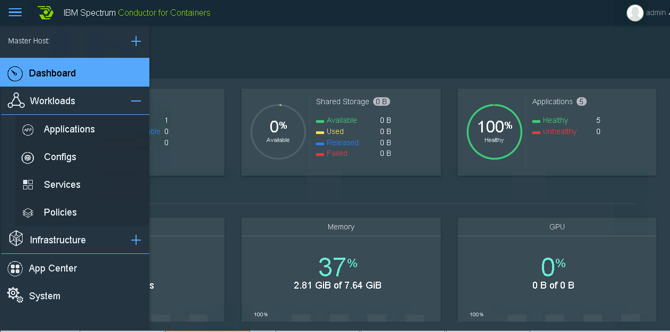
This stuff is the foundation for Connections Next and I can live with the requirements regarding CPU / RAM.

If you just want to use Docker with Kubernetes plus one of the other UI tools, then you are good with a “normal” sized VM ( 1 CPU / 4 GB ). This will also be part of my Docker session at AdminCamp 2017.


Notes FP8 (IF1) might stop your custom sidebar plugins from working

We got a call from one of our customers reporting a defect in our midpoints doc.Store sidebar plugin. It worked in Notes 9.0.1FP7 but stopped working after the upgrade to FP8.

I was able to reproduce in our development environment. In the error log, we saw the following error message

at lotus.domino.local.Session.FindOrCreate(Unknown Source)
at lotus.domino.local.ViewEntry.getDocument(Unknown Source)
at de.midpoints.docstore.notes.model.DocStoreDocumentCollectionBuilder.calculateDocumentCollection(Unknown Source)
at de.midpoints.docstore.notes.views.DocStoreView$32.run(Unknown Source)
at org.eclipse.core.internal.jobs.Worker.run(Unknown Source)

I was able to find a fix for this particular issue. But there is also an entry in the German Notes Forum reporting similar defects after the upgrade.

I opened a PMR with IBM. IBM is already aware of the issue. According to IBM support, a fix is supposed to be shipped with FP9.

IBM support also proposed a workaround:

The issue does not occur when using the Notes.jar of the 901FP7 with the 901FP8 installation.

Some error messages from the lower levels of the JavaStack:

java.lang.ClassCastException: lotus.domino.local.View
incompatible with lotus.domino.local.Session
at lotus.domino.local.Session.FindOrCreate(Unknown Source)
at lotus.domino.local.Database.getView(Unknown Source)
—–

java.lang.ClassCastException: lotus.domino.local.Document
incompatible with lotus.domino.local.Session
at lotus.domino.local.Session.FindOrCreate(Unknown Source)
at lotus.domino.local.Database.getDocumentByUNID(Unknown
Source)
—————

java.lang.ClassCastException: lotus.domino.local.Item
incompatible with lotus.domino.local.Session
at lotus.domino.local.Session.FindOrCreate(Unknown Source)
at lotus.domino.local.Document.getItems(Unknown Source)

The issue is tracked at IBM under SPR # RGAUALXF5R / APAR LO92228