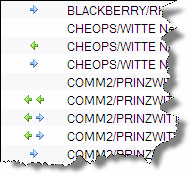
 I wanted to have a quick overview on how the servers replicate and if replication is enabled w/o. opening each document.
The easiest way to accomplish this is to insert a new row into the “Server\Connections” view in the Domino Directory. The view displays values as colors. If replication or schedule is disabled for a connection, the column does not show an icon.
The following formula is used to visualize the replication direction.
_PullPull:=178:178;
_PullPush:=178:179;
_PullOnly:=178;
_PushOnly:=179;
@If(RepTask="0" | Enabled="0";"";
@If ( RepType="0";_PullPull; RepType="1";_PullPush; RepType="2";_PullOnly; RepType="3";_PushOnly;
""))
Nice touch!
korrekte Anzeige nur in Clients >R6, in R6 ist da ein kleiner Briefumschlag an den Pfeilen. Aber ansonsten nice!