Notes.ini Preferences Plug-In For Lotus Notes 8

Notes.ini preferences plug-in (sreenshot) is the Eclipse 3.2 compatible plug-in integrated into Lotus Notes 8 client’s File/Preferences area, which allows you perform such tasks as:

– view all settings of your local Lotus Notes 8 client’s notes.ini file in sorted way
– quick lookup of each setting via the type ahead control
– add/edit/remove any setting
– request each setting description from configured description repositories via WebServices (one of such WebServices enabled repositories is provided by company called Kalechi Design, USA, which hosts Notes.ini database prepared by Rudi Knegt from RKJ-Soft)

[via Infosana]

No Information About Free Time

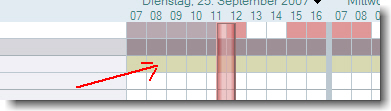
No Information About Free Time When planning a meeting, some users do not see any information about free time of some of the invited persons. When you right click on the planner, you can open the calender. When you click left, a “You are not authorized … ” error message occurs in the client’s statusbar.


Access to free time information is set company wide by policy to be visible to all people.

I found out that in all cases where this issue occurs, the “AllowList” field in the persons entry in clubusy.nsf was not empty, although it should be empty

Field Allow List

It seems that the field value is not properly deleted or updated when either the adminp tries to install the new mail policy or the user edited the calendar profile document.
When you delete the entries from the field, information about free time is provided.
So far, so good. After the server has updated the clubusy.nsf the error occurs again.
Then I looked closer at the calendar profile and found an entry in the “AllowBusyAccess” field.

AllowBusyAccess

Deleting the entry in this field and running a “tell sched validate username” after deleting the user document in the clubusy.nsf finally solved the problem.

Update: Now SPR “MFUN77EK4R”


Document Conflict Resolver

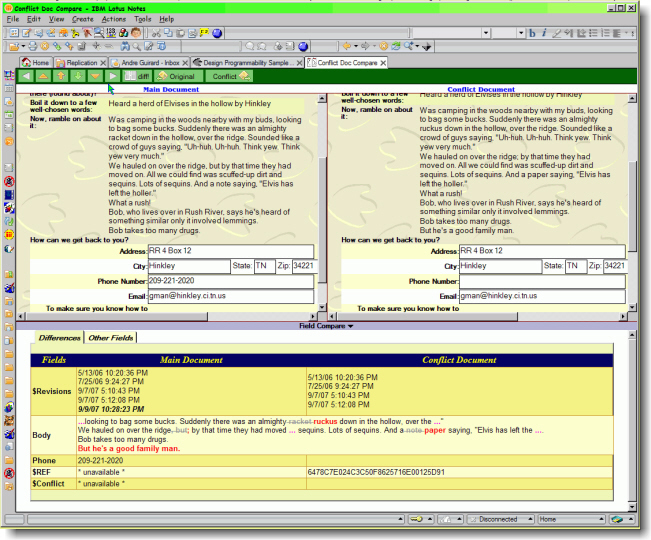
Andre Guirard published an end-user tool that includes a toolbar button you can click while you have a replication conflict document open or highlighted (or the main document), and it will open the replication conflict and main document side by side to compare them visually. There’s also a list of the field differences and a marked-up version of any rich text showing what has changed.

Document Conflict Resolver

[DOWNLOAD]


OpenNTF Advisory Board

OpenNTF will be establishing an Advisory Board to help take the site and the Lotus Community it serves to the next level. I am happy to inform you that nominations to fill nine council posistions are now being accepted and will be open through Friday, September 21, 2007. In order to fill out the nomination form you will need have your OpenNTF username and password. If you do not have a username and password you can get one here.

OpenNTF Advisory Council - Nominations now open