Month: October 2006

kommerziell = konventionell ?
Neulich im Helpdesk:

Das kommt davon, wenn man den Umgang mit Fremdwörtern nicht konfekt beherrscht. … 😉
Insert RichText into RichText with LotusScript – Chapter 2
 In an earlier post I wrote about how to insert richtext from another document into a specific position in an exiting richtext item using DXL. This solution works fine but has a few limitations. One of this limitations is the handling of attachments and embedded objects.
So I was looking for another solution. I tried to use LotusScript but due to some missing methods there is no way to achive the goal.
Then I searched the C++ API and found
LNSTATUS Insert( const LNRichText &richtext, LNRTCursor *cursor )
This was exactly what I was looking for. I wrote a small console application to test this method. The function did exactly what it is supposed to do.
Using the
LNSTATUS GotoFirst( const LNString &searchstring )
method, it is possible, to insert the richtext at a specific position that can be defined by a placeholder. The placeholder can be of any name.
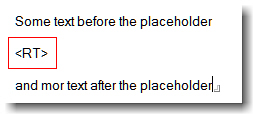
To delete the placeholder before inserting the replacing content, I use
rtTarget.Delete( &cursor, sizeof( InsertionPoint ));
I guess this is what IBM does when you use the FindAndReplace method of the NotesRichTextRange class. But with this metod you can replace text only. Replacing a string with richtext is not supported. I wonder, why IBM does not enhance this method. In my oppinion this is not very hard to do; as I stated before, the Notes API already has this functionality.
After a few more tests with attachments and embedded objects, I put all this stuff into an DLL. Now the function can be used from inside LotusScript. I decided to provide this new functionality as an DLL because all of my attempts to create an LSX ( using the LSX toolkit ) constantly crashes my client. Even with some help from Bill Buchan and Benjamin Langhinrich I was not able to build a stable function. Maybe i will succeed some day …
To use the InsertRichTextItem function from LotusScript, you have to copy “rt.dll” to your notes executable directory. Since the function uses the C++ API, you have to copy “lcppn70.dll”, too. I have created and tested the function with Notes 7.0.1, but it should work in former versions of Notes as well.
In the Declaration section of your Lotus Script put the following lines
Declare Function InsertRichTextItem Lib "rt" (_
Byval dbServer As String,_
Byval dbPath As String,_
Byval lngSourceNoteID As Long,_
Byval strSourceRTField As String,_
Byval lngTargetNoteID As Long,_
Byval strTargetRTField As String,_
Byval InsertionPoint As String) As String
The function is called as follows
strRet = InsertRichTextItem ( DB_SERVER, DB_FILE, SourceNOTEID, "Body", TargetNOTEID, "Body","
The function returns “OK” when completed successfully, otherwise it throws an error.
Sub Click(Source As Button)
Dim s As New NotesSession
Dim db As NotesDatabase
Dim col As NotesDocumentCollection
Dim doc As NotesDocument
Dim SourceDoc As NotesDocument ' contains the richtext to be inserted
Dim TargetDoc As NotesDocument ' insert RT here
Dim rtItem As NotesRichTextItem
Dim retval As Integer
Set db = s.GetDatabase( DB_SERVER, DB_FILE)
Set col = db.AllDocuments
Set SourceDoc = col.GetNthDocument(2) ' SecondDocument
Set TargetDoc = col.GetNthDocument(1) ' FirstDocument
Dim SourceNOTEID As Long
Dim TargetNOTEID As Long
' Convert NOTEID from HEX to Long
TargetNOTEID = Val("&H" + TargetDoc.NoteID)
SourceNOTEID = Val("&H" + SourceDoc.NoteID)
Msgbox InsertRichTextItem ( DB_SERVER, DB_FILE, SourceNOTEID, "Body", TargetNOTEID, "Body","
Attached you’ll find a sample database. The necessary files are included in the “first document” – doc.
If you find this function useful, pls. let me know.
Technorati: Show-n-Tell Thursday
AUTOLAUNCH_NOTES=nlnotes
When you run autorun.exe to launch the Lotus Notes® client installed on a USB drive, the Notes client installed on the operating system (OS) comes to focus instead. This behavior occurs only if the local version of Notes is already running on the OS. If the local version of Notes is not running, the Notes client from the USB will launch.
To run Notes from the USB drive even if a local version of Notes is running, do the following:
1. Open the autorun.ini file on the USB drive in edit mode.
2. Change the following line:
AUTOLAUNCH_NOTES=yes
to
AUTOLAUNCH_NOTES=nlnotes.exe
3. Save the file, and then run autorun.exe again.
Using the Web Client for the IBM Lotus Domino 7.0.2 Blog Template
The IBM® Lotus® Domino® 7.0.2 Blog Template allows you to add content and resources such as images using both the Lotus Notes® client or by a simple web browser client.
This web browser client is usable via Microsoft® Internet Explorer or Mozilla Firefox. This technote explains how to use the web client.
Notes 7.0.2 – NOMAD
Installed Lotus Notes on my 1GB Cruzer SanDisk USB Drive today. As you can see, the estimated time for installation was 32 minutes; At least it took 45 minutes to install the client. This is far to long. Copying 300MB of data from my local drive C: to the usb device is normally done within 2 Minutes or so.

UPDATE:
I found this hint on LDD regarding a TEMP_DIR issue:
“Currently the TEMP_DIR variable in your AUTORUN.INI file for IBM Lotus Notes client on a USB drive installation only works when your client is automatically launched. When launching the client from the “Lotus Notes on USB” desktop icon, the temporary files will be stored in the local system’s temporary directory,
When adding the TEMP_DIR variable to your AUTORUN.INI, also set AUTOLAUNCH_NOTES=Yes (default). After inserting the USB drive into your computer, if your Notes client is either (1) automatically launched, or (2) you run the command AUTORUN.EXE from the root of the USB drive which launches the client, then the temporary file will be stored in the path for the temporary directory you specified.”
Differences between the IBM Lotus Domino 7.0.2 Blog Template and previous external versions
The Domino Blog template, which was developed and maintained for over 3 years by an external source (Steve Castledine), was acquired by IBM® and incorporated into Lotus® Notes/Domino® 7.0.2.
Therefore, some IBM customers are already familiar with the template.
When the template was brought into IBM, some changes had to be made in order to:
- remove Open source code
- ease support of the template
- simplify use of the template
- change the user interface to fit in with IBM standards
- make Language translation easier
These changes have, therefore, resulted in some feature removals, feature alterations and a different user interface (UI), which are discussed in this technote.
USB Drive Letter Manager
USBDLM is a Windows service that gives control over Window’s drive letter assingment for USB drives. Running as service makes it independent of the logged on user’s previleges, so there is no need to give the users the previlege to change drive letters.
It automatically solves conficts between USB drives and network or subst drives of the currently logged on user.
Furthermore you can define new default letters for USB drives and much more.