Nagios, Centreon and DAOS

heA few days ago, I started to play with Nagios. Nagios is a powerful monitoring system that enables organizations to identify and resolve IT infrastructure problems before they affect critical business processes.

I’ve setup a Linux VM using CentOS 5. As always when you install a package on Linux, there are several dependencies and sometimes it is hard to get it all done. I found a small script in the web that has been created to do the setup of Nagios and Nagios Plugins as well as ndoutils and mysql and stuff.

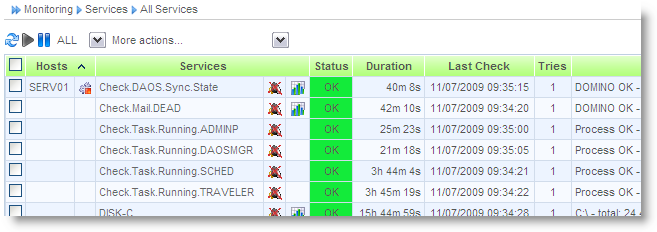
It also installs Centreon. Centreon (a.k.a Oreon) is a GUI for Nagios.  As you can see from the screenshot, I have successfully installed and configured all components.
nagiosplugin

Nagios and Centreon are Open Source products and can be used at no charge. There are several plugins for all kinds of checks available.

The most flexible wy to check a process state or get statistic values is using SNMP. With SNMP you do not need to install any client on the server. Read the Administration help on how to enable SNMP for Domino.

All of the plugins that came with Nagios uses a threshold to determine the state of a value ( OK, CRITICAL, WARNING … ).

I wanted to check the DAOS Catalog state on my Domino but was not able to do so, because the SNMP request return a non-numeric value. Non-numeric values cannot be passed as a parameter to the plugin.

I decided to write my own plugin from scratch. You can write plugins for Nagios in Perl. The Nagios::Plugin module from CPAN makes it easy to write a Nagios plugin even when you are an unexpierienced Perl developer like me.I learned the basics from the 15 minutes screencast by Ton Voon.

You can download the source code for check_domino_eknori.pl here.

To perform a normal check, start the script with the following syntax

./check_domino_eknori.pl -H 192.168.178.20 -C SINGULTUS -o Mail.Dead -c 9 -w 6

If you want to check for non-numeric return values, you have to tweak the -o parameter

./check_domino_eknori.pl -H 192.168.178.20 -C SINGULTUS -o Synchronized~DAOS.Engine.Catalog -c “Needs Resync” -w Resyncing

Simply put the value that will reflect the OK state before the object and seperate both values with a ~  (Tile).

The output looks like this

DOMINO OK – DAOS.Engine.Catalog – Synchronized

If you ere attending AdminCamp 2009 and you want to get more information about how to monitor you Domino server environment with Nagios, visit Christoph Stoettner’s session.

And if you want to watch a developer talking admin stuff, please vistit my session on DAOS.  ( Read agenda ) Not yet registered? Read here how to save money and register today for AdminCamp 2009 in Gelsenkirchen, Germany!

ReportGenerator Class

Andre Guirard presents a class for creating rich-text reports and displaying them in a few different ways. It includes code to deal with the problem of paragraphs getting too long, and conversely, the problem of having too many paragraphs.

Basically, when you want to have a line break in your report, the class only starts a new paragraph if you specify it has to. Otherwise it uses line break, unless the paragraph is getting too long, in which case it starts a new paragraph.


Calculate Elapsed Time Between Two Date/Time Values

For my OpenNTF project !!HELP!! I needed a function to calculate the elapsed time between two events. The code should be able to exclude holidays and weekends. In addition it should calculate the time difference only within workhours. Here is the result of a rainy sunday 🙂
There is another class by Sean Burgess, which does the same stuff than mine.

The following sample returns the amount of time in minutes between two given date/time values

Sub Click(Source As Button)
	Dim startdt As String
	Dim enddt As String
	Dim dtc As New DateTimeCalculator ( "1,7","24.12.2007","7:00~17:00")

	startdt = "18.06.2007 16:59"
	enddt = "19.06.2007 07:01"

	Msgbox dtc.GetElapsedTime(startdt,enddt)
End Sub

Copy the following code to a script library. Type

Use "YourLibName"

into the Options section of your button, agent or whereever you like to use the lib. Don’t forget to include Julian Robichaux’s OpenLog for error trapping.

Class DateTimeCalculator

	Private StartDT As NotesDateTime
	Private EndDT As NotesDateTime
	Private dt3 As NotesDateTime
	Private dt4 As NotesDateTime
	Private dt5 As NotesDateTime
	Private WDENDHOUR As String
	Private WDSTARTHOUR As String
	Private nondays As String
	Private holidays As String

	Sub New (strExcludeDays As String,strExcludeDates As String,SERVICEHOURS As String)
		On Error Goto ERRHANDLE

		WDSTARTHOUR = "00:00"
		WDENDHOUR = "23:59"
		nondays = "0"
		holidays = "[01/01/1899]"

		If SERVICEHOURS <> "" Then
			WDSTARTHOUR = Strtoken(SERVICEHOURS,"~",1)
			WDENDHOUR = Strtoken(SERVICEHOURS,"~",2)
		End If
		If strExcludeDays <> "" Then
			nondays = Implode(Split(strExcludeDays,","),":")
		End If
		If strExcludeDates <> "" Then
			holidays = Implode(Split(strExcludeDates,","),"]:[")
			holidays = "[" & holidays & "]"
		End If

EXITPOINT:
		Exit Sub
ERRHANDLE:
		Call LogError()
		Resume EXITPOINT
	End Sub

	Public Function GetNextBusinessDay (dt1 As String) As String
		On Error Goto ERRHANDLE
		Dim newDT As Boolean
		Set Me.StartDT = New NotesDateTime(dt1)
		NewDt = False
		Set dt3 = New NotesDateTime(Me.StartDT.DateOnly & " " & Me.WDSTARTHOUR)
		Set dt4 = New NotesDateTime(Me.StartDT.DateOnly & " " & Me.WDENDHOUR)
		If Me.StartDT.TimeDifference(dt3) < 0 Then ' StartDT < WDSTARTHOUR
			Set Me.StartDT = dt3
		End If

		If dt4.TimeDifference(Me.StartDT) < 0 Then ' StartDT > WDENDHOUR
			Set Me.StartDT = dt3
			Call Me.StartDT.AdjustDay(1)
		End If

		While Me.GetBusinessDays (StartDT.DateOnly,StartDT.DateOnly ) = 0
			Call StartDT.AdjustDay(1)
			NewDT = True
		Wend

		If NewDT Then
			Set dt5 = New NotesDateTime(Me.StartDT.DateOnly & " " & Me.WDSTARTHOUR)
			Set Me.StartDT = dt5
		End If

		GetNextBusinessDay = Me.StartDT.LocalTime

EXITPOINT:
		Exit Function
ERRHANDLE:
		Call LogError()
		Resume EXITPOINT
	End Function

	Private Function GetNumBusinessDayHours () As Integer
		On Error Goto ERRHANDLE
		Dim BDHOURS1 As New NotesDateTime(Today & " " & Me.WDSTARTHOUR)
		Dim BDHOURS2 As New NotesDateTime(Today & " " & Me.WDENDHOUR)
		GetNumBusinessDayHours = Fix(((BDHOURS2.TimeDifference(BDHOURS1)/60)Mod 1440)/60)

EXITPOINT:
		Exit Function
ERRHANDLE:
		Call LogError()
		Resume EXITPOINT
	End Function

	Private Function GetTimeDifference (strStart As String,strEnd As String ) As Long
		On Error Goto ERRHANDLE
		Dim BDSTART As New NotesDateTime(strStart)
		Dim BDEND As New NotesDateTime(strEnd)
		GetTimeDifference = Fix((BDEND.TimeDifference(BDSTART)/60)Mod 1440)

EXITPOINT:
		Exit Function
ERRHANDLE:
		Call LogError()
		Resume EXITPOINT
	End Function

	Public Function GetBusinessDays(dtStart As String,dtEnd As String) As Integer
		On Error Goto ERRHANDLE
		Dim busdays As Variant

		Dim BDS As New NotesDateTime(dtStart)
		Dim BDE As New NotesDateTime(dtEnd)

		busdays = Evaluate(_
		{@BusinessDays([}&_
		Cdat(BDS.DateOnly)& {];[}&_
		Cdat(BDE.DateOnly)& {];}&_
		Me.nondays &{;}&_
		Me.holidays & {)})
		GetBusinessDays = Cint(busdays(0))

EXITPOINT:
		Exit Function
ERRHANDLE:
		Call LogError()
		Resume EXITPOINT
	End Function

	Public Function GetElapsedTime (dtStart As String,dtEnd As String) As Long
		On Error Goto ERRHANDLE
		Dim intStart As Long
		Dim intMiddle As Long
		Dim intEnd As Long
		Dim i As Integer

		Set dt3 = New NotesDateTime(dtStart)
		Set dt4 = New NotesDateTime(dtEnd)
		If dt3.DateOnly = dt4.dateonly Then ' same day
			GetElapsedTime = Me.GetTimeDifference(dtStart,dtEnd)
		Else
			intStart = Me.GetTimeDifference(dtStart,Cstr(dt3.DateOnly & " " & Me.WDENDHOUR))
			intMiddle = 0
			i = Me.GetBusinessDays(dtStart,dtEnd)-2
			If i > 0 Then
				intMiddle = (i*Me.GetNumBusinessDayHours())*60
			End If
			intEnd = Me.GetTimeDifference(Cstr(dt4.DateOnly & " " & Me.WDSTARTHOUR),dtEnd)
			GetElapsedTime = intStart+intMiddle+intEnd
		End If

EXITPOINT:
		Exit Function
ERRHANDLE:
		Call LogError()
		Resume EXITPOINT
	End Function
End Class

Adjust Date/Time To Next Business Day – Part II

In my recent posting I showed a method to calculate the number of business days between one date and another. It is possible to exclude weekends and a list of dates, too.
How to adjust Date/Time to next business day, I’ve already described here.

When using the GetBusinessDays method from my recent posting, the code to adjust a date to the next business day can be reduced to at least this snippet:

Sub Click(Source As Button)
	Dim dtStart As String
	Dim dtEnd As String
	dtStart = Today
	dtEnd = dtStart

	Dim b As New BusinessDay("1:7","[18.06.2007]:[19.06.2007]:[20.06.2007]")
	Dim StartDT As NotesDateTime

	Set StartDT = New NotesDateTime (dtStart)
	While b.GetBusinessDays (dtStart,dtEnd ) = 0
		Call StartDT.AdjustDay(1)
		dtEnd = StartDT.DateOnly
	Wend

	Msgbox StartDT.DateOnly
End Sub

This is a great example of how evaluating @formulas in LotusScript can save you a lot of time when you want to write a function which is not available in Script.


@BusinessDays In LS

In R6 you can use @BusinessDays to calculate the number of working days between one date and another, excluding non-working days and a list of dates to exclude as well. As there is no equivalent in LotusScript, I wrote a small class to simulate @BusinessDays in LS.
Actually I did not reinvent the wheel, but simply used evaluate in combination with @BusinessDays to achieve the aim.

Here is my code:

Class BusinessDay

	Private holidays As String
	Private nondays As String

	Sub New (strExcludeDays As String,strExcludeDates As String)
		holidays = "[01/01/1899]"
		nondays = "0"
		If strExcludeDays <> "" Then
			nondays = strExcludeDays
		End If

		If strExcludeDates <> "" Then
			holidays = strExcludeDates
		End If
	End Sub

	Public Function GetBusinessDays(dtStart As String,dtEnd As String) As Integer

		Dim bd As Variant
		Dim StartDT As New NotesDateTime(dtStart)
		Dim EndDT As New NotesDateTime(dtEnd)

		GetBusinessDays = 0
		bd = Evaluate({@BusinessDays([}&_
		Cdat(StartDT.DateOnly)& {];[}&_
		Cdat(EndDT.DateOnly)& {];}&_
		Me.nondays &{;}&_
		Me.holidays &_
		{)})
		GetBusinessDays = Cint(bd(0))
	End Function

End Class

To test the code, put the code into the declaration section of a button. In your “Click” event type

Sub Click(Source As Button)
	Dim dtStart As String
	Dim dtEnd As String
	dtStart = "05.06.2007"
	dtEnd = "11.06.2007"

	'Dim b As New BusinessDay("1:7","[08.06.2007]:[06.06.2007]:[07.06.2007]")
	'Dim b As New BusinessDay("","[08.06.2007]:[06.06.2007]:[07.06.2007]")
	Dim b As New BusinessDay("","")
	Msgbox b.GetBusinessDays (dtStart,dtEnd )
End Sub

Adjust Date/Time To Next Business Day

Finding the difference in seconds between one date-time and another can be done using the timedifference method of the NotesDateTime class in LotusScript. In formula language, @BusinessDays returns the number of business days in one or more date ranges.
Assume you have the following requirements:

  • Calculate the time in minutes between “DateCreated” and “DateClosed”.
  • Businessdays are from Monday to Friday
  • BusinessHours ar from 8 AM to 10 PM
  • Exclude holidays
  • If the date/time value is greater than the end of a businessday, set date to next businessday
  • if the date/time value is before the beginning of a businessday, set the time to i.e 8 AM

Here is a LotusScript class which does the trick.

Class DateTimeCalculator

	Private StartDT As NotesDateTime
	Private EndDT As NotesDateTime
	Private dt3 As NotesDateTime
	Private dt4 As NotesDateTime
	Private dt5 As NotesDateTime
	Private NewDT As Boolean
	Private tmp As Variant
	Private i As Integer
	Private j As Integer
	Private k As Integer
	Private x As Integer
	Private elapsed As Integer
	Private ExcludeDays() As String
	Private ExcludeDates() As NotesDateTime
	Private WDENDHOUR As String
	Private WDSTARTHOUR As String

	Sub New (strExcludeDays As String_
                       , strExcludeDates As String_
                       , strWDSTARTHOUR As String_
                       , strWDENDHOUR As String)

		If strWDSTARTHOUR = "" Then
			WDSTARTHOUR = "00:00"
		Else
			WDSTARTHOUR = strWDSTARTHOUR
		End If

		If strWDENDHOUR = "" Then
			WDENDHOUR = "23:59"
		Else
			WDENDHOUR = strWDENDHOUR
		End If

		' strExcludeDays contains a comma separated list of dayes that are not work days
		tmp = Split(strExcludeDays,",")
		Redim Me.ExcludeDays(Ubound(tmp))
		For x = 0 To Ubound(tmp)
			Me.ExcludeDays(x) = tmp(x)
		Next

		' strExcludeDates contains a comma separated list of dates that are not work days
		tmp = Split(strExcludeDates,",")
		Redim Me.ExcludeDates(Ubound(tmp))
		For x = 0 To Ubound(tmp)
			Set Me.ExcludeDates(x) = New NotesDateTime(tmp(x))
		Next
	End Sub

	Public Function GetNextBusinessDay ( dt1 As String )As String
		Set Me.StartDT = New NotesDateTime (dt1)
		NewDt = False
		Set dt3 = New NotesDateTime (Me.StartDT.DateOnly & " " & Me.WDSTARTHOUR)
		Set dt4 = New NotesDateTime (Me.StartDT.DateOnly & " " & Me.WDENDHOUR)
		If Me.StartDT.TimeDifference(dt3) < 0 Then ' StartDT < WDSTARTHOUR
			Set Me.StartDT = dt3
		End If

		If dt4.TimeDifference(Me.StartDT) < 0 Then ' StartDT > WDENDHOUR
			Set Me.StartDT = dt3
			Call StartDT.AdjustDay(1)
		End If

		For j = 0 To Ubound ( Me.ExcludeDates ) ' Check for excluded dates
			For k = 0 To Ubound ( Me.ExcludeDates )
				If Me.StartDT.DateOnly = Me.ExcludeDates(k).DateOnly Then
					Call Me.StartDT.AdjustDay(1)
					NewDT = True
					For i = 0 To Ubound ( Me.ExcludeDays ) ' Check if businessday
						If Instr(Implode ( Me.ExcludeDays )_
                                                    , Cstr(Weekday(Me.StartDT.DateOnly))) > 0 Then
							Call Me.StartDT.AdjustDay(1)
						End If
					Next
					k = Ubound(Me.ExcludeDates)
				Else
					For i = 0 To Ubound ( Me.ExcludeDays ) ' Check if businessday
						If Instr(Implode ( Me.ExcludeDays _
                                                    ), Cstr(Weekday(Me.StartDT.DateOnly))) > 0 Then
							Call Me.StartDT.AdjustDay(1)
							NewDT = True
						End If
					Next
				End If
			Next
		Next

		If NewDT Then
			Set dt5 = _
                          New NotesDateTime (Me.StartDT.DateOnly & " " & Me.WDSTARTHOUR)
			Set Me.StartDT = dt5
		End If
		GetNextBusinessDay = Me.StartDT.LocalTime
	End Function

End Class

This class has a New function that is used to instantiate the class. A list of business days, list of holidays and the start and end of the workday is passed when the object is created.

	Dim DTCalc As New DateTimeCalculator ( "1,7", "11.06.2007","08:00", "22:00")

Once instatiated you can now adjust a date/time value to the next business by calling the GetNextBusinessDay method and passing the date/time value as a string parameter.

	StartDT = doc.GetFirstItem("DateCreated").text
         ...
        Set dt1 = New NotesDateTime ( DTCalc.GetNextBusinessDay(StartDT) )

The returned value can now be used to find the difference between this date/time value and another one.

	diff = dt2.TimeDifference(dt1)/60

Here is an example of how to put this all together in a click button. I have attached a sample database at the end of this article.

Sub Click(Source As Button)
	Dim s As New NotesSession
	Dim db As NotesDatabase
	Dim col As NotesDocumentCollection
	Dim doc As NotesDocument
	Set db = s.CurrentDatabase
	Set col = db.UnprocessedDocuments
	Set doc = col.GetFirstDocument

	Dim msg As String
	Dim StartDT As String
	Dim EndDT As String
	Dim dt1 As NotesDateTime
	Dim dt2 As NotesDateTime
	Dim diff As Long

	StartDT = doc.GetFirstItem("DateCreated").text
	EndDT = doc.GetFirstItem("DateClosed").text

	Dim DTCalc As New DateTimeCalculator ( "1,7", "11.06.2007","08:00", "22:00")

	Set dt1 = New NotesDateTime ( DTCalc.GetNextBusinessDay(StartDT) )
	Set dt2 = New NotesDateTime ( DTCalc.GetNextBusinessDay(EndDT) )

	diff = dt2.TimeDifference(dt1)/60
	msg = msg  & "Created On : " & StartDT & CRLF
	msg = msg  & "Closed On : " & EndDT & CRLF
	msg = msg & "Difference : " & diff & " minutes"
	Msgbox msg
End Sub

Download SampleDB


View Navigation

I was looking for a solution to replace the standard view navigation by something more “stylish”. And the solution should be easy to implement.

Domino Web Navigation - old style

I googled and came across an old article written by Bob Obringer ( The Ultimate Domino View Navigator ). His solution can be implemented with just a basic understanding of Domino Web Development.
I built it into an existing database in just a few minutes and the result is impressive.

Domino Web Navigation - new

The navigator can be customized using CSS. So jump over and download the needed files to “pimp” your web views 😉


Get Rules From Users Mailfile

A few days ago I was asked to create a report about all rules in all mailfiles. The easiest way to do this is to write an agent to examine the mailfiles.
The result of this scan is stored in a Notes database.
Put the following code into an agent ( start: manually from menue, target: All Selected Documents )

Sub Initialize
	On Error Resume Next
	Dim session As New NotesSession
	Dim NAB As NotesDatabase
	Dim resultDocs As NotesDocumentCollection
	Dim MailFiles As NotesDocumentCollection

	Dim doc As NotesDocument
	Dim NABDoc As NotesDocument
	Dim rtitem As Variant
	Dim MailFileItem As NotesItem
	Dim i As Integer
	Dim NabDocCounter As Integer
	Dim fNAME As String
	Dim logline As String
	Set NAB = session.CurrentDatabase
	Set MailFiles = NAB.UnprocessedDocuments

	Dim RetCode As Integer
	Dim MailServer As String
	Dim MailFile As String

	Dim db_AllDocsCol As NotesDocumentCollection
	Dim db_User As String
	Dim archiveDb As New NotesDatabase( "", "RULEZ.NSF" )
	Dim k As Integer
	For NabDocCounter = 1 To MailFiles.Count
		db_User = ""
		Set NABDoc = MailFiles.GetNthDocument ( NABDocCounter )
		Set MailFileItem = NABDoc.GetFirstItem ( "LastName" )
		db_User = MailFileItem.Text & ", "
		Set MailFileItem = NABDoc.GetFirstItem ( "FirstName" )
		db_User = db_User + MailFileItem.Text

		Set MailFileItem = NABDoc.GetFirstItem ( "MailServer" )
		MailServer = MailFileItem.Text
		Set MailFileItem = NABDoc.GetFirstItem ( "MailFile" )
		MailFile = MailFileItem.Text
		Dim db As New NotesDatabase ("", "" )
		Call db.Open ( MailServer, MailFile )

		If db.IsOpen Then
			Dim dateTime As New NotesDateTime(_
			Cstr(Datenumber(2000, 5, 1)))

			Set resultDocs = db.Search( {@UpperCase(Form)="MAILRULE"}, dateTime,0)
			Call ResultDocs.StampAll ("RuleOwner", db_user)
			For k = 1 To resultDocs.Count
				Set doc = resultDocs.GetNthDocument ( k )
				Call doc.CopyToDatabase ( archiveDB )
			Next
		End If
	Next
End Sub

When the agent finds rules in a mailfile, it copies the documents found into a Notesdatabase defined in the following line of code.

Dim archiveDb As New NotesDatabase( "", "RULEZ.NSF" )

The database itself does not have any design elements except a modified DEFAULT view. The view contains 3 columns.

Column 1: Field RuleOwner
Column 2: Field ConditionList
Column 3: Field ActionList

That’s all !

Technorati:


openCOD the OpenNTF-ish open source Blackberry site

openCOD
openCOD is an open source initiative for BlackBerry handheld applications and the wide variety of backend systems you might want to extract data from or update using a BlackBerry handset. Members of openCOD get together to share their ideas, expertise and enthusiasm to create BlackBerry applications and games and release the source code for others to download and use.

[via Bruce Elgort, Taking Notes]


Insert RichText into RichText with LotusScript – Chapter 2

In an earlier post I wrote about how to insert richtext from another document into a specific position in an exiting richtext item using DXL. This solution works fine but has a few limitations. One of this limitations is the handling of attachments and embedded objects.

So I was looking for another solution. I tried to use LotusScript but due to some missing methods there is no way to achive the goal.

Then I searched the C++ API and found

LNSTATUS Insert( const LNRichText &richtext, LNRTCursor *cursor )

This was exactly what I was looking for. I wrote a small console application to test this method. The function did exactly what it is supposed to do.

Using the

LNSTATUS GotoFirst( const LNString &searchstring )

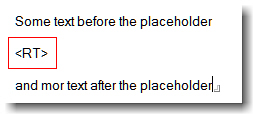
method, it is possible, to insert the richtext at a specific position that can be defined by a placeholder. The placeholder can be of any name.

Insert Richtext - the placeholder

To delete the placeholder before inserting the replacing content, I use

rtTarget.Delete( &cursor, sizeof( InsertionPoint ));

I guess this is what IBM does when you use the FindAndReplace method of the NotesRichTextRange class. But with this metod you can replace text only. Replacing a string with richtext is not supported. I wonder, why IBM does not enhance this method. In my oppinion this is not very hard to do; as I stated before, the Notes API already has this functionality.

After a few more tests with attachments and embedded objects, I put all this stuff into an DLL. Now the function can be used from inside LotusScript. I decided to provide this new functionality as an DLL because all of my attempts to create an LSX ( using the LSX toolkit ) constantly crashes my client. Even with some help from Bill Buchan and Benjamin Langhinrich I was not able to build a stable function. Maybe i will succeed some day …

To use the InsertRichTextItem function from LotusScript, you have to copy “rt.dll” to your notes executable directory. Since the function uses the C++ API, you have to copy “lcppn70.dll”, too. I have created and tested the function with Notes 7.0.1, but it should work in former versions of Notes as well.

In the Declaration section of your Lotus Script put the following lines

Declare Function InsertRichTextItem Lib "rt" (_
Byval dbServer As String,_
Byval dbPath As String,_
Byval lngSourceNoteID As Long,_
Byval strSourceRTField As String,_
Byval lngTargetNoteID As Long,_
Byval strTargetRTField As String,_
Byval InsertionPoint As String) As String

The function is called as follows

strRet = InsertRichTextItem ( DB_SERVER, DB_FILE,  SourceNOTEID, "Body", TargetNOTEID, "Body","")

The function returns “OK” when completed successfully, otherwise it throws an error.

Sub Click(Source As Button)

	Dim s As New NotesSession
	Dim db As NotesDatabase
	Dim col As NotesDocumentCollection
	Dim doc As NotesDocument

	Dim SourceDoc As NotesDocument ' contains the richtext to be inserted
	Dim TargetDoc As NotesDocument ' insert RT here

	Dim rtItem As NotesRichTextItem
	Dim retval As Integer

	Set db = s.GetDatabase( DB_SERVER, DB_FILE)
	Set col = db.AllDocuments
	Set SourceDoc = col.GetNthDocument(2) ' SecondDocument
	Set TargetDoc = col.GetNthDocument(1) ' FirstDocument

	Dim SourceNOTEID As Long
	Dim TargetNOTEID As Long

	' Convert NOTEID from HEX to Long
	TargetNOTEID = Val("&H" + TargetDoc.NoteID)
	SourceNOTEID = Val("&H" + SourceDoc.NoteID)

	Msgbox InsertRichTextItem ( DB_SERVER, DB_FILE,  SourceNOTEID, "Body", TargetNOTEID, "Body","")

End Sub

Attached you’ll find a sample database. The necessary files are included in the “first document” – doc.

If you find this function useful, pls. let me know.

Technorati:


Get the template name from a database

Here is a quick LotusScript tip on how to get the name of the template that is used for a specific database. The NotesDatabase Class has a method to determine the template name. But this only works for a template file itself ( template.ntf ) As far a I could find out, there is no method to grab the template name for a database.

I found out theat the name is stored in the NotesDatabase icon. The icon can be accessed as any other Notes document. From Release 6 on there is a new class called NotesNoteCollection class . The NotesNoteCollection class represents a collection of Domino design and data elements in a database.

I did a quick debug to find the proper place to look for the template name value. Well, here is the code.

Function getTemplate( db As NotesDatabase ) As String

	Dim template As String, aux As String
	Dim nc As NotesNoteCollection
	Dim icon As notesdocument
	Dim noteid As String

	getTemplate = ""
	Set nc = db.CreateNoteCollection( False )
	nc.SelectIcon = True
	Call nc.BuildCollection

	Set icon = db.GetDocumentByID( nc.GetFirstNoteId )

	If Not icon Is Nothing Then
		getTemplate = icon.Parentdatabase.DesigntemplateName
	End If

End Function

To test the code, put the funktion together with the following code into an action button in a view of your “sandbox” database

Sub Click(Source As Button)
	Dim s As New NotesSession
	Dim db As NotesDatabase
	Set db = s.currentdatabase
	Msgbox getTemplate ( db )
End Sub

Notes on a USB Key – Chapter 2

wendyI changed the code for my project “Wendy” once again. In the former version of nstart.exe, the file had to be copied to the Notes executable directory.
This is no longer necessary now; you can copy nstart.exe to i.e the “root” directory of your USB key, regardless of where your Notes Client is installed. nstart.exe locates the notes.ini and notes.exe, makes the necessary changes and starts the client.

This is NOT project “WANDA”, IBM announced at Lotusphere2006. It is my solution on how to put a Notes client “installation” on a USB key. But I’m eager to see what IBM’s solution will look like.

Does anyone have some information about project “WANDA” ?

/////////////////////////////////////////////////////////////////////////////
//  nstart.cpp
/////////////////////////////////////////////////////////////////////////////
#include "stdafx.h"
#include "nstart.h"
#include "SADirRead.h"

#ifdef _DEBUG
#define new DEBUG_NEW
#undef THIS_FILE
static char THIS_FILE[] = __FILE__;
#endif

/////////////////////////////////////////////////////////////////////////////
#define NOTES_INI "notes.ini"
#define NOTES_PRG "notes.exe"
#define BACKSLASH ":\\"

CString Drives ="CDEFGHIJKLMNOPQRSTUVWXYZcdefghijklmnopqrstuvwxyz";
CFile* fin =	NULL;
CFile* fout =	NULL;
CWinApp			theApp;
CSADirRead		FSearch;
CFileException	ex;
CString			THE_NOTES_INI;
CString			THE_NOTES_EXE;
char			AppPath[MAX_PATH];
char			pbuf[99999];
int				i, j, m, n;
using namespace std;

/////////////////////////////////////////////////////////////////////////////
int _tmain(int argc, TCHAR* argv[], TCHAR* envp[])
{
	int nRetCode = 0;

	if (!AfxWinInit(::GetModuleHandle(NULL), NULL, ::GetCommandLine(), 0))
	{
		cerr < < _T("Fatal Error: MFC initialization failed") << endl;
		nRetCode = 1;
	}

	else

	try
	{
		GetModuleFileName(AfxGetApp()->m_hInstance,AppPath,MAX_PATH);

		CString BS(_T(BACKSLASH));
		CString strPath(AppPath);
		CString ThisDrive (strPath.Left(1) + BS);

		FSearch.ClearDirs();
		FSearch.GetDirs(ThisDrive, true);
		FSearch.ClearFiles();
		FSearch.GetFiles(NOTES_INI);

		CSADirRead::SAFileVector &IniFile = FSearch.Files();

		for (CSADirRead::SAFileVector::const_iterator m = IniFile.begin();
			m!=IniFile.end(); m++) {

			THE_NOTES_INI = ("%s\n", (*m).m_sName);
		}

		fin =	new CFile( THE_NOTES_INI,
				CFile::modeRead | CFile::shareDenyNone);

		// read NOTES.INI
		ULONGLONG dwLength = fin->GetLength();
		ULONGLONG nBytesRead = fin->Read( pbuf,dwLength );
		fin->Close();

		CString buffer(pbuf);

		// replace drive letters with current drive
		for	(i=0; i < Drives.GetLength() ; i++ ) {

			CString DriveLetter (_T(Drives.GetAt(i) + BS));
		    j = buffer.Replace(_T(DriveLetter), _T(ThisDrive));
		}

		// write notes.ini
		fout =	new CFile( THE_NOTES_INI ,
				CFile::modeWrite | CFile::shareDenyWrite);

		fout->Write(_T(buffer),dwLength);
		fout->Flush();
		fout->Close();

		// search Notes executable
		FSearch.ClearDirs();
		FSearch.GetDirs(ThisDrive, true);
		FSearch.ClearFiles();
		FSearch.GetFiles(NOTES_PRG);

		CSADirRead::SAFileVector &ExeFile = FSearch.Files();

		for (CSADirRead::SAFileVector::const_iterator n = ExeFile.begin();
			n!=ExeFile.end(); n++) {

			THE_NOTES_EXE = ("%s\n", (*n).m_sName);
		}

		// start the client
		ShellExecute(0, "open", THE_NOTES_EXE, 0, 0, 1);
	}

	catch (CFileException* pEx)
	{
		// if an error occurs, just make a message box
		pEx->ReportError();
		pEx->Delete();
		nRetCode = 1;
	}
	catch (...)
	{
		nRetCode = 1;
	}

	return nRetCode;
}

Excel Report Class

Christian Gorni today released his Excel Report Class on OpenNTF.

Just use the database. It includes the complete ExcelReport class and two agent examples. As a teaser, the following is all you need to export a view to excel in LotusScript:

Set view = ws.CurrentView.View
Set report = New ExcelReport(excelfilepath, False)
Call report.exportNotesView(view, Sheet, OffsetX, OffsetY, isWithHeader, includeIcons, includeColors, includeHidden)
Call report.setVisibility(True)

Of course the obvious (getting and setting cells, saving, …) is also included. Be careful, because error handling is not yet implemented.

Here are the implemented methods:

Sub new (xlFilename As String, isVisible As Boolean)
Sub delete ()
Function save ()
Function saveAs (filename as String)
Function quit ()
Function setCell ( Sheet As Variant , row As Integer , column As Variant , value As String )
Function getCell ( Sheet As Variant , row As Integer , column As Variant ) As String
Function setVisibility (isVisible As Boolean)
Function setCellColor ( Sheet As Variant , row As Integer , column As Variant, innercolor As Variant )
Function setCellFont ( Sheet As Variant , row As Integer , column As Variant, style As Variant, size As Variant, color As Variant )
Function getVersion () As String
Function exportNotesView (view As NotesView, Sheet As Variant, OffsetRow As Integer, OffsetCol As Integer, isWithHeader as Boolean, includeIcons As Boolean, includeColors As Boolean, includeHidden As Boolean)

How to use a list to get around the Array size limit

In LotusScript, arrays have a upper boundary limit of 32,767. Specifically, the subscript range may be from -32787 to 32,767. If you try declare a larger Array size, you receive the following error when saving the code:

Illegal array bound for

If you attempt to use ReDim to redimension an Array beyond the bounds, the following error will occur:

Overflow

Depending on how the bound value is set, the above error can occur when saving the code or when executing the code.

You may use a List variable to work around the Array size limits in LotusScript. Lists are automatically resized as elements are added or removed. Lists differ from Arrays in that they are not categorized by an integer value, but instead by a List tag. The List tag can be any string.

In cases where you are converting from using an Array to a List, it may be easiest to use a string representation of a integer value for the List tag. This can easily be done using the Cstr function.

For example, if you used the following construction with an Array:

Dim i As Long
Dim arraytest() As String
For i = 0 To 100000
    Redim Preserve arraytest(i)
    arraytest(i) = ...
Next

The List equivalent usage would be:

Dim i As Long
Dim mylist List As String
For i = 0 To 100000
    mylist(Cstr(i)) = ...
Next

Lists only allow unique List tag values. This can be beneficial in some application designs.
For example, if you want to have a unique List entry for each part number, you could use the part number as the List tag. You could note how much inventory you had of particular parts by using the part number as the List tag and the number of parts as the List entry value:

Dim parts List as Integer
parts("N001")=10
parts("N002")=12

The IsElements function can be used to determine if a List contains a List tag:

If (Iselement(parts("N003")) = False) Then
      'Returns False if there is no list tag "N003"
End If

NOTE: The following usage is allowed even if the List tag did not previously exist. The result is that the List entry for “N004” in the parts List will have a value of 1.

parts("N004")=parts("N004")+1

The above construction would be useful when decrementing a List value by a certain amount. For example, if you wanted to decrement the number of parts by an order size:

If ordersize>parts("N004") Then
      'Not enough parts on hand...
Else
     'Have enough parts, decrement inventory by ordersize
      parts("N004")=parts("N004")-ordersize
End If

Lotus Notes KnowledgeBase document #1221020


Pad A Number Field With An Exact Number Of Leading Zeros

If you have a number that needs to be padded with leading zeros, this technique does it using Formula language. The same technique (with appropriate syntax changes) can be used in most programming languages.

Padded := @Right( "00000000" + @Text(Number); 8)

This example returns an eight-character text string (stored in variable “padded” in this example). This string consists of the original value in the Number field, padded with leading zeros to a total length of 8 characters. For example, Number 123 results in Padded 00000123.


Play MP3 without WINAMP using Lotus Script

Do you remember “MP3 PlayMate ” for Lotus Notes written by Allan Reinhold Kildeby ?

Well, it is a very nice tool, but you need Winamp to play the mp3 files.
Today it is one of these boring sundays and I thougth to myself: “Wouldn’t it be nice to play the mp3s directly thru some nice API code ? “.

By using MCI, you can play most media files. but normaly, it doesn’t work for MP3. This is because mp3-data needs to be rendered specially. After a beer or two i had an idea while looking at the code using DirectShow: why not play the mp3-files as VIDEO? OK, here’s how it works:

(1.) Declare the Function

Declare Function mciSendString Lib "winmm.dll" Alias "mciSendStringA"_
(Byval lpszCommand As String,_
Byval lpszReturnString As String,_
Byval cchReturnLength As Long,_
Byval hwndCallback As Long) As Long

(2.) Use “mciSendString” to invoke the commands:

Syntax: mciSendString(sCommand, 0, 0, 0)

where sCommand is:

Load the mp3 file:=  “open ” & sMp3FileLocation & ” type MPEGVideo alias Mp3File”
Play the mp3 file (Now you can use the Alias):= “play Mp3File” from 0″
Pause:= “pause Mp3File””
Stop:= “stop Mp3File”
and unload from mem, unlock file:= “close Mp3File”

(3.) put the commands into a button for testing purpose

Sub Click(Source As Button)
	Dim sCommand As String
	Dim sMP3FileLocation As String
	sMP3FileLocation = "whateverMP3youlike.mp3"
	sCommand = "Open " & sMP3FileLocation & "  type MPEGVideo alias MP3File"
	Call mciSendString(sCommand, 0, 0, 0)
	scommand = "play MP3File from 0"
	Call mciSendString(sCommand, 0, 0, 0)
	Msgbox "OK"
	scommand = "stop MP3File"
	Call mciSendString(sCommand, 0, 0, 0)
	scommand ="close MP3File"
	Call mciSendString(sCommand, 0, 0, 0)
End Sub

(4.) tweak PlayMate
(5.) Have fun !!


Code eines View Icon ermitteln

iconcode

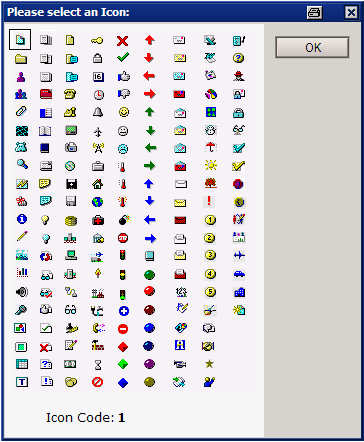
“Wert als Symbol darstellen” ist in Ansichten eine schöne Möglichkeit zur Visualisierung von Feldinhalten etc. In einem Konfigurationsdokument soll dem Admin der Datenbank die z.B. Möglichkeit gegeben werden, die Auswahl der Icons selber vorzunehmen. Aber wie war noch gleich der Wert eines bestimmten Symbols ?

Die Maske kann an geeigneter Stelle mit der Formel

@DialogBox("($dlgIconCode)"; [AutoHorzFit] : [AutoVertFit] : [NoCancel] ; "Please select an Icon:");
@Command([ViewRefreshFields])

ausgerufen werden. Die Icons und der zugehörende Code können dann bequem interaktiv ausgewählt und in das Konfigurationsdokument übernommen werden.

DOWNLOAD


Check Formula Syntax

Beim Erstellen von Aktionen, die in Masken oder Ansichten eingebunden werden sollen überprüft Lotus Notes automatisch beim Speichern, ob die Syntax der eingegebenen Formel richtig ist.

Was aber, wenn man eine Formel an ein db.search übergeben möchte? Man kann natürlich die zu verwendende Formel im Developer Client von Lotus Notes überprüfen lassen und dann in seinen Script Code einbinden. Das funktioniert solange, wie man mit starren Formeln arbeitet.
Wie prüft man aber die Validität einer Formel, wenn diese z.B. über ein Konfigurationsdokument eingegeben wird.
( z.B. in !!HELP!! ) ?

Seit Version 6 gibt es die Formel @CheckFormulaSyntax( Feldname ). Feldname enthält die zu prüfende Formel.

CAPTION	:= "Formula Syntax Check";
SYNTAX_OK:= "Formula Syntax is OK";

Result	:= @CheckFormulaSyntax(nFormula);
Error	:= Result[1];
Line:= Result[2];
Column:= Result[3];

@If(Error = "1";
	@Prompt([Ok]; CAPTION; SYNTAX_OK);
	@Prompt([Ok]; CAPTION; "Line " + Line + " Column " + Column +": " + Error)
)

Wie ich eingangs erwähnt habe, gibt es die Formel erst ab Version 6. Aber auch unter R5 lässt sich die syntaktische Richtigkeit einer Formel überprüfen. Dazu bedarf es aber der Notes API. Die hier beschriebene Version funktioniert auf Windows Clients.

Read More