Install VISTA in just 2 Minutes
Watch this video and learn how to install Windows VISTA in about 2 minutes only …
Watch this video and learn how to install Windows VISTA in about 2 minutes only …
Take advantage of and implement the extremely useful IBM Lotus Notes and Domino security feature, Reader Names fields. Learn how this feature affects replication, agents, and views and how to troubleshoot two common problems with Reader Names fields.
read the full article by Raphael Savir here
[ via Jean-Yves Riverin, LDD]
Welcome to the Lotus Notes / Domino blog community !
Never mind.
On Monday, there will be information on how to view the Opening General Session online
[ via Ed Brill ]
In addition, there is a Live Blogging from Lotusphere page where you can “instantly” see what Bruce Elgort, Julian Robichaux, Ed Brill and others are writing during the show.

This site has been created so that people not attending Lotusphere can still get a feel for the atmosphere and any announcements that are taking place during the General Opening Session.
The site is built by Carl Tyler from Instant Technologies and hosted by connectria
Another announcement by Ed Brill
I’ve been given the green light to announce that 40-plus Lotusphere presentations from the AD, ID, INV, and JMP tracks will be posted as podcasts to developerWorks during March 2007
 When using @SetViewInfo to filter a view, you can reset the filter with the following formula:
@SetTargetFrame("NotesView");
@Command([OpenView]; @Subset(@ViewTitle; -1));
@SetViewInfo([SetViewFilter]; ""; ""; 1)
This will work fine as long as you do not want to go to the top of the view after removing the filter.
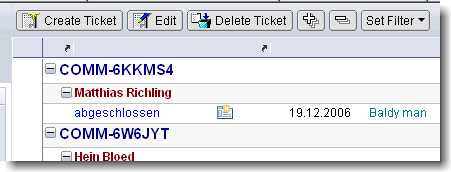
This is the view before setting the filter
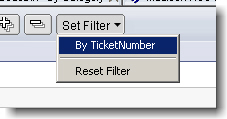
Now we set a filter to show only entries according to a selected ticket number
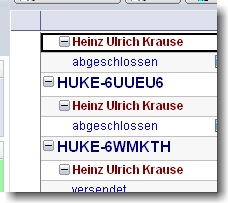
Don’t be confused that the first column isn’t shown after the filter is applied ( Notes works as designed )

Now we remove / reset the filter using the formula show before

The filter is removed but the view does not show the entries from top of the view
Here is my workaround for this problem. I found out that the view opens from top, when you change to another view first and then re-open the view in question. So what can be done manually could even be done programmatically.
To avoid opening an existing view in the database with possibly a lot of documents in the view, I created a “dummy” view.
This view neither shows any documents nor it has columns and actions. A real empty view, indeed.

At least I changed the “Reset Filter” action to the following code:
@SetTargetFrame("NotesView");
@Command([OpenView];"dummy");
@Command([OpenView]; @Subset(@ViewTitle; -1));
@SetViewInfo([SetViewFilter]; ""; ""; 1)
When you now reset the filter, the view will open from top.
Technorati: Show-n-Tell Thursday
Auf dem neuen Community-Portal www.D11B.tv können FuÃ?ball- und Comedy-Begeisterte jetzt hautnah erleben, wie es in der Umkleidekabine der deutschen Nationalelf wirklich zugeht:
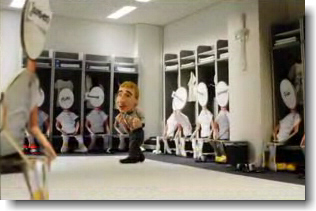
Die Internetplattform bietet den Fans die Möglichkeit, brandneue, lustige Clips der Trickfilm-Serie â??Deutsche 11 backstageâ?? anzusehen, Olli Kahns virtuellen Spind beim Gewinnspiel abzusahnen, sich über Neuigkeiten auf dem Blog auszutauschen und verschiedene digitale Extras für das Handy herunterzuladen.
Thomas Schulte today joined the Lotus Notes and Domino blog community. According to his own words his blog is about
… not fully implemented or thought through or flawed parts within the Lotus Notes/Domino environment.
Microsoft Windows PowerShell command line shell and scripting language helps IT Professionals achieve greater productivity.
Using a new admin-focused scripting language, more than 130 standard command line tools, and consistent syntax and utilities, Windows PowerShell allows IT Professionals to more easily control system administration and accelerate automation.
Windows PowerShell is easy to adopt, learn, and use, because it works with your existing IT infrastructure and existing script investments, and because it runs on Windows XP, Windows Vista and Windows Server 2003.
The Master Chiefs of the OpenNTF Mail Experience project today made available another cool release.

It comes in two versions; a “classic” version and a “Anniversary edition” which is modified to match Web 2.0 colors and icons.
I’m now waiting for the german version.
The transfer speed of Lotus Notes® on a USB drive varies by manufacturer. In some cases, the Notes install has taken over 60 minutes. Are there any known workarounds for this issue?
This document explains, how to install to a local drive and then move the install files to a USB drive.
Neulich im Helpdesk:

Das kommt davon, wenn man den Umgang mit Fremdwörtern nicht konfekt beherrscht. … 😉
When you run autorun.exe to launch the Lotus Notes® client installed on a USB drive, the Notes client installed on the operating system (OS) comes to focus instead. This behavior occurs only if the local version of Notes is already running on the OS. If the local version of Notes is not running, the Notes client from the USB will launch.
To run Notes from the USB drive even if a local version of Notes is running, do the following:
1. Open the autorun.ini file on the USB drive in edit mode.
2. Change the following line:
AUTOLAUNCH_NOTES=yes
to
AUTOLAUNCH_NOTES=nlnotes.exe
3. Save the file, and then run autorun.exe again.
The IBM® Lotus® Domino® 7.0.2 Blog Template allows you to add content and resources such as images using both the Lotus Notes® client or by a simple web browser client.
This web browser client is usable via Microsoft® Internet Explorer or Mozilla Firefox. This technote explains how to use the web client.
Installed Lotus Notes on my 1GB Cruzer SanDisk USB Drive today. As you can see, the estimated time for installation was 32 minutes; At least it took 45 minutes to install the client. This is far to long. Copying 300MB of data from my local drive C: to the usb device is normally done within 2 Minutes or so.

UPDATE:
I found this hint on LDD regarding a TEMP_DIR issue:
“Currently the TEMP_DIR variable in your AUTORUN.INI file for IBM Lotus Notes client on a USB drive installation only works when your client is automatically launched. When launching the client from the “Lotus Notes on USB” desktop icon, the temporary files will be stored in the local system’s temporary directory,
When adding the TEMP_DIR variable to your AUTORUN.INI, also set AUTOLAUNCH_NOTES=Yes (default). After inserting the USB drive into your computer, if your Notes client is either (1) automatically launched, or (2) you run the command AUTORUN.EXE from the root of the USB drive which launches the client, then the temporary file will be stored in the path for the temporary directory you specified.”
The Domino Blog template, which was developed and maintained for over 3 years by an external source (Steve Castledine), was acquired by IBM® and incorporated into Lotus® Notes/Domino® 7.0.2.
Therefore, some IBM customers are already familiar with the template.
When the template was brought into IBM, some changes had to be made in order to:
These changes have, therefore, resulted in some feature removals, feature alterations and a different user interface (UI), which are discussed in this technote.
The Extended Formula Language improves the native formula language of Lotus Notes in several important points, e.g.:
There is no installation routine.
Just copy two script libraries of the example database into the database you want to use XFL programming in. If you still have Notes R4 clients copy the subform too. That’s all.
Extended Formula Language is written and provided by Bert Haessler.
Jens-B. Augustiny und Christian Tillmanns haben heute ein neues Projekt auf OpenNTF gestartet.
Ziel ist es, das bereits seit längerem verfügbare OpenNTF Mail Template Projekt ins Deutsche zu übersetzen. Bisher waren die nützlichen Ergänzungen der Standard Mail Schablone nur in englischer Sprache verfügbar.
Danke an Jens und Christian für dieses Projekt. Ich denke, es wird ebenso erfolgreich werden, wie das “Ur”-Projekt.

