First Server Updated To 8.5.1
After some trouble with my entitlements, I was finally able to download Notes / Domino 8.5.1.
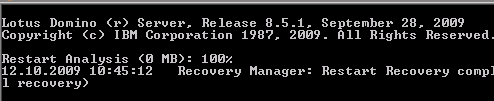
After some trouble with my entitlements, I was finally able to download Notes / Domino 8.5.1.
By default the Telnet client does not come installed on Windows 7. To enable the client, just do the following
1. Click on Start Menu >> Control Panel >> Programs
2. Click on Turn Windows Features On or Off
3. Mark Telnet Client and click OK
I will be on holiday from tuesday until the end of october.

On 21-Oct-2009 I will celebrate my 5oth birthday under the caribbean sun. I’m looking forward relaxing on the beach.
… With Domino 8.5.1, IBM also is making Domino Designer application development software available free of charge. Software developers will be able to download Domino Designer free from IBM’s developerWorks site to build and extend Notes and Domino applications.
via Ed Brill
Update:
the electronic general availability for Notes/Domino 8.5.1 will be Monday, October 12.
When your DAOS catalog gets out of sync, it has to be resynced again. This has not do be done immediately, because an out of sync catalog only affects the prune process. DAOS will work even with an out of sync catalog.
An earlier entry in the Lotus Notes and Domino Wiki described, how to automatically resync the catalog with DDM. This document has now been removed and replaced by a description of how to do the process using a program document. (DAOS: How To Set Up A Regularly Scheduled Resynchronization).
The most important information in this document is
Note that if a resync operation is performed when the DAOS catalog is already in ‘Synchronized’ state, the operation detect that there is no work to do, and will exit immediately.
This seems to be obvious as there is also a “tell daosmgr resync force” command, which will resync the catalog even if in syncronized state.
But the administration help is not clear enough as far as I’m concerned.
But what is the best time to schedule the program document? You can find out the best time for your environment by using the Log Analysis from the Administration Client.
If you want to be sure that the catalog is synchronized before 02:00 am, you have to find out how long the resync process lasts.
Open the Log Analysis in the Administration Client and search for “DAOSMGR: Resync” ( Match all words ).
You will get a result like

If you want to schedule a daily resync after the prune process, you need to know, how long the prune process runs on the server.
Using Log Analysis and “DAOSMGR: Prune” for the search, you will get this result.
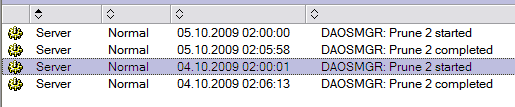
Now you can configure the program document and set the schedule time either 7 hours before or 15 minutes after the daily prune operation.
A few minutes ago, I received an email from Microsoft. Watch the subject 🙂

I’m looking forward to receiving the final one.
AdminCamp 2009 is over. Here are the slides from my presentation on DAOS and other space savers. Enjoy. Any comments are appreciated.
Darren Duke recently wrote an article about DAOS optimization in Domino 8.5.1 and replication. In his article he says that there is no advantage when creating a new replica.
I tested today and here are my findings. I use a Domino cluster with 2 servers running Domino 8.5.1.
When you create a new copy using the admin client then an “accelerated create replica” request is created in admin4.nsf. In this case that won’t take advantage of DAOS exploitation as that is basically just an OS copy of the file.
But the DAOS team did a great job. When the source server determines that the target server is DAOS enabled, then adminp creates a normal replica creation request. Now only those attachments that do not already exist as .NLO files on the target server are transfered to the target. If an attachment already exists on the target server, only the ticket is replicated.
I did some more research and found a technote about “When is the AdminP “Accelerated Create Replica” feature used?”
And here I found a possible cause for the behaviour Darren mentioned in his article.
You can force to always use “accelerated create replica” by setting the following parameter in the notes.ini of the source server.
ADMINP_ACCELERATED_REPLICA_OVERRIDE=4
Pls. review your notes.ini settings to take the full advantage of DAOS optimization features in the upcoming 8.5.1 release of Lozus Notes / Domino. I will also send this as a new rule proposal to the DCT team.
Today I came across an issue with DAOS and DCT. I thought it was an error in DCT. When I setup my test environment, I did not touch the default value for DAOSMinObjSize in the DAOS section of the server document.
After I ran DCT on this server, I found the following entry in the scan results.
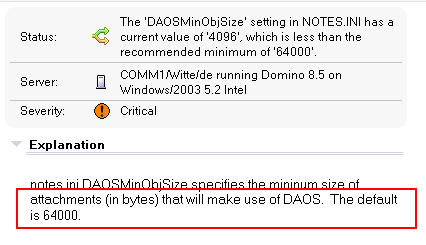
I contacted Scott O’Keefe and asked him to review this rule. Scott replied immediately ( as always )
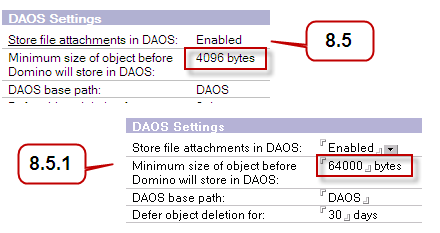
The default value has been changed in pubnames.ntf so that when DAOS is enabled the default minimum object size is 64000, to match the suggestion of the wiki.
Ich frage mich ernsthaft, ob das ein vorgezogener Aprilscherz sein soll, oder ob man den IBM Praktikanten nicht einfach mal sinnvolle Aufgaben auftragen kann.
Muss wirklich jeder Scheiss ge-twittert, ge-facebooked, ge-irgendwas werden? Aprospros Scheiss; wann bringt Charmin endlich das twitternde Klopapier auf den Markt?
[via Winfuture.de]
Only 28 days left until AdminCamp 2009 in Gelsenkirchen, Germany starts.
The organization team again has put together an interesting agenda. Gab Davies, Paul Mooney, Daniel Nashed and Chistoph Stöttner ( just to mention a few ) are on the speaker list.
Oh, before I forget; I’ll be presenting at AdminCamp 2009 on DAOS. I will also cover other space savers like LZ1 compression, design note and document data compression. All examples will not only be shown on slides but also on a clustered Domino environment with NAS attached.
If you not yet have registered, do it now. You will get a €50,- discount when submitting “Ulrich Krause” as reference during your registration.
When you install Lotus Notes on a PC or laptop and the installation is inteded to be used by more than one user, each subsequent user’s personal data (contacts, bookmarks, notes.ini, and so on) are installed under “C:\Documents and Settings”, and there was no option to change that.
With Lotus Notes 8.51 you will be able to change that. Using command line options, you can uniquely specify the shared and user-specific data directories on the Notes install command line using MSI properties or in an MSI transform.
To configure a Notes custom data directory during multi-user install or upgrade, use the following command line in conjunction with your Notes install kit.
setup.exe /v “SETMULTIUSER=1 MULTIUSERBASEDIR=C:\LocalAppDataUsers\!USERNAME! MULTIUSERCOMMONDIR=C:\LocalAppDataCommon”
The shared notes.ini file is created in the directory specified by MULTIUSERCOMMONDIR and a user-specific copy of the notes.ini file is created in the directory specified by MULTIUSERBASEDIR. The expanded notes.ini path is written to the HKEY_CURRENT_USER registry.
IBM Lotus Notes/Domino and Lotus Notes Traveler 8.5.1 is prerelease software and there are no guarantees from IBM that the functionality presented will be in the final shipping product.
As of version 8.5.1 the Lotus Notes client is now able to recognize that a Domino server is enabled for DAOS.
This significantly improves connection speed for users of mail and other databases on the server.
I’ve tested this new feature with a 250MB attachment. The first time I attached the file to a new document, it took the same time it takes to attach the file using a client prior to 8.5.1.
Then I created another document and attached the same file again. 5 seconds to calculate the hash and to recognize that the attachment is already stored as NLO in the DAOS repository and a glimps of an eye to save and close the document.
The new Show Stat DAOS commands provides information on this optimization.
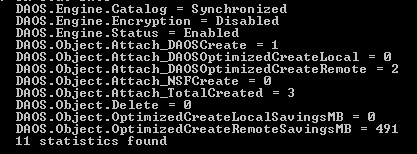
As you can see from the stats, I tested 3 times with the same attachment; 2 times it was not neccessary to transfer the file to the server which saves 491MB.
This amount of data had to be transferred to the server with a client prior to Notes 8.5.1.
IBM Lotus Notes/Domino and Lotus Notes Traveler 8.5.1 is prerelease software and there are no guarantees from IBM that the functionality presented will be in the final shipping product.
I had the chance to play with the 8.5.1 (Beta) Developer client today. I’m impressed. The client opens a database lightning-fast ( compared to 8.5 ). When you look at the statusbar while loading and opening a database in designer, you will see, that the tool is still working on some tasks but you are able to access your forms and code while this tasks are about to finish. ( elevator effect ?? )
Lotusscript now has a new look and finally it has a class-browser.

IBM Lotus Notes/Domino and Lotus Notes Traveler 8.5.1 is prerelease software and there are no guarantees from IBM that the functionality presented will be in the final shipping product.
Found this link in the Lotus Software KnowledgeBase.
“IBM is introducing a new way to access technical support information for all of your IBM products and services.
This early release of the IBM Support Portal currently supports Power Systems, and Lotus, Rational, WebSphere, Information Management, and Tivoli products.”
You can Try the new IBM Support Portal site now and give IBM some feedback, or View the introductory IBM Support Portal videos.

