Experts Like These
They always practice what they preach ?? Well think again after you have seen this
They always practice what they preach ?? Well think again after you have seen this
Have you ever seen this error message on the Domino server console?
Error: “11/24/2006 10:51:05 Event: Error updating a Domino Domain Monitoring event document (NoteID 0xF2AA): Event correlation cache is full. You can increase its size via the NOTES.INI setting EVENT_CORRELATION_POOL_SIZE”
If so, then I assume you know that you can increase the cache size by adding the parameter
EVENT_CORRELATION_POOL_SIZE=104800000
to the server’s notes.ini for a maximum cache size of 100MB.
But, surprise, surprise, the error will occur again. I opened a PMR today because I could not find any useful information on the web. Mateja Kozamernik from IBM support Slovenia pushed me into the right direction and sent me the information I needed.
“Even with the maximum configured pool size, you may still see the above error. This occurs because Domino creates cached documents that are 2MB in size and the server allows a maximum of 200 cached documents by default.
Since 2MB x 200 is greater than the maximum allowable pool size, the error can occur unless additional parameters are enacted to control the document size and/or the maximum number of cached documents. The following notes.ini parameters are available for these purposes.
DDM_MAX_NOTE_CACHE (number of documents in the cache)
DDM_MAX_DOCSIZE_MB (size in megabytes of documents in the cache)
To ensure that the Event Correlation cache will not be exhausted when configured to the maximum 100MB size, use these parameters so that the following formula is true:
DDM_MAX_NOTE_CACHE x DDM_MAX_DOCSIZE_MB <= 100″
A few days ago we had a discussion on the German Notes Forum (www.atnotes.de) about how to setup DWA. One of the disadvantages of Domino is that you cannot use the passthru feature for web access as you would do when accessing a mailfile thru your companies firewall via a Notes client.
If you want to give your users access to their mails from outside the company via browser access, you would normally setup an additional server in the DMZ and store a replica of each user’s mailfile on the server. Another way of implementing web access is using a reverse proxy.
A reverse proxy is a gateway for servers, and enables one web server to provide content from another transparently. As with a standard proxy, a reverse proxy may serve to improve performance of the web by caching; this is a simple way to mirror a website. But the most common reason to run a reverse proxy is to enable controlled access from the Web at large to servers behind a firewall.
I’m not much of an administrator and when I searched Google for some How To I could not find any Lotus Notes / Domino related article. So I decided to try things out on my own. Here is what i found out so far.
I’m using OpenSUSE 10.3. The file/pathnames might be different in other distributions.
Install Linux; choose a minimal installation. I only added apache2 as an additional package. After installation you should see a “It works” page, when apache2 is running.
Now you can start to configure your reverse proxy settings.
Goto /etc/apache2 and append
Include /etc/apache2/mod_proxy_html.conf
to httpd.conf and save your changes.
Create a new file mod_proxy_html.conf in /etc/apache2 with the following content
# mod_proxy_html.conf, 2008 - Ulrich Krause

LoadModule proxy_module      /usr/lib/apache2/mod_proxy.so
LoadModule proxy_http_module /usr/lib/apache2/mod_proxy_http.so
LoadModule headers_module    /usr/lib/apache2/mod_headers.so

ProxyRequests off

ProxyPass /names.nsf http://Your_Internal_Server/names.nsf
ProxyPassReverse http://Your_Internal_Server/names.nsf /names.nsf

ProxyPass /domjava/ http://Your_Internal_Server/domjava/
ProxyPassReverse http://Your_Internal_Server/domjava /domjava/

ProxyPass /mail/ http://Your_Internal_Server/mail/
ProxyPassReverse /mail/ http://Your_Internal_Server/mail/

ProxyPass /iNotes/ http://Your_Internal_Server/iNotes/
ProxyPassReverse /iNotes/ http://Your_Internal_Server/iNotes/

ProxyPass /icons/ http://Your_Internal_Server/icons/
ProxyPassReverse /icons/ http://Your_Internal_Server/icons/
Save the file and restart apache with /etc/init.d/apache2 restart.
Type http://Your_Proxy/mail/yourmail.nsf in your browser. After login, your mailfile will be opened.
Not bad for a developer, isn’t it?
For additional reading on how to use Apache as reverse proxy, I recommend: Running a Reverse Proxy in Apache and Configuring iNotes Web Access with a WebSphere Edge reverse proxy server.
Nokia E71, Nokia E66, Nokia E90 Communicator, Nokia E70, Nokia E65, Nokia E63, Nokia E62, Nokia E61i, Nokia E61, Nokia E60, Nokia E51, Nokia E50, Nokia N96, Nokia N85, Nokia N79, Nokia N95 8GB, Nokia N95, Nokia N82, Nokia N81 8GB, Nokia N81, Nokia N78, Nokia N77, Nokia N76, Nokia N75, Nokia N73, Nokia N93, Nokia N93i, Nokia N80, Nokia N91, Nokia N92, Nokia N71, Nokia 3250, Nokia 5500, Nokia 6290, Nokia 6110 Navigator, Nokia 6120 Classic, Nokia 6121 Classic, Nokia 6122 Classic, Nokia 6124, Nokia 6650 Fold, Nokia 5320 XpressMusic, Nokia 5700, Nokia 6210 Navigator, Nokia 6220 Classic
These Nokia devices are compatible with IBM Lotus Notes Traveler 8.5. Read this Nokia press release for more information.
Ben Langhinrichs has published his Annual Lotusphere Agenda Database for PDA Synching and Session Planning.
The database can be replicated so it will stay up-to-date when changes in the agenda occur. According to Gabrielle Davis a BB and iPhone version will be available as soon as the schedules are published with timings.
And, if you are a blogger or a LS speaker, you should read this article on Ben’s blog, too
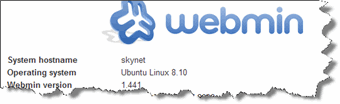
Webmin is a web-based interface for system administration for Unix. Using any modern web browser, you can setup user accounts, Apache, DNS, file sharing and much more. Webmin removes the need to manually edit Unix configuration files like /etc/passwd, and lets you manage a system from the console or remotely.Currently There is no Webmin package in the Ubuntu repositories.This tutorial will explain how to Install Webmin in Ubuntu Intrepid Ibex
You can install webmin for your server web interface to configure apache2, mysql, FTP servers and many more.
Now we will see how to install webmin in Ubuntu 8.10
I have only a minimal system installed, so some packages are missing and have to be installed before webmin itself can be installed.
Login to the console and execute the following command. This will install the missing packages
sudo aptitude install perl libnet-ssleay-perl openssl libauthen-pam-perl libpam-runtime libio-pty-perl libmd5-perl
No we can download the latest version from sourceforge.net
sudo wget http://garr.dl.sourceforge.net/sourceforge/webadmin/webmin_1.441_all.deb
Now we have webmin_1.441_all.deb package, install this package using the following command
sudo dpkg -i webmin_1.441_all.deb
Ubuntu in particular don’t allow logins by the root user by default. However, the user created at system installation time can use sudo to switch to root. Webmin will allow any user who has this sudo capability to login with full root privileges.
Now you need to open your web browser and enter the following
https://your-server-ip:10000/
That’s all, folks!
Our company ( an automotive supplier ) will close for almost 4 week from mid december on due to the global financial crisis.
As a result, all employees have to spend their remaining days of vacation for the plant shutdown. So there are no days left for my planned trip to Lotusphere 2009.
I intended to stay the week before Lotusphere in Jamaica together with my SWMBO, then attend Lotusphere the next week, and return to Jamaica for another week before flying back home.
All trips are cancelled now. Sad day today …
NotesNet.ch recently released version 0.8.0 of Pop3Collect. POP3Collect reads messages from one or more POP3 servers and sends them to an SMTP server (Domino, Exchange, Sendmail or any other compatible SMTP Server).
Version 0.8.0 comes with the following new features
Pop3Collect is a great tool and it’s FREEWARE! So, go and get it from here.
Recently had an eMail contact with Bastian HowTo Fix: duplicate PUIDs found
One problem we both have is that there is no information about this parameter. Does anyone has any info about it?
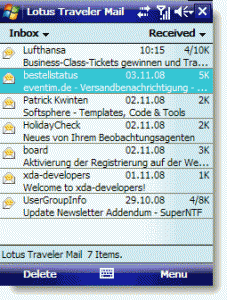 The My Mobiler desktop application controls your Windows Mobile device through its Active Sync connection.
What you see in the desktop application is real time and you can interact with your mobile device using the mouse and keyboard as though you were holding the phone in your hand. It has screenshot and video capture capabilities as well as the ability to cut and paste between the phone and desktop environment. The MyMobiler desktop interface even has the ability to emulate the physical keys on the phone which lets you fully interact with the device. My Mobiler is a free download for Windows only.
It’s a great tool for live presentations of traveler and other mobile stuff.
A Lotus Notes® database can be enabled to use soft deletions. This means that when a user deletes a document, it is moved to a special view for a period of time before it is actually deleted.
You create a view containing soft deletions by specifying its type as being “Shared, contains deleted documents” in the Create View dialog box. However, once created, there is no indication in Lotus Domino® Designer that the view has this purpose. How can you identify what views in a database are used for soft deletions?
A view used for soft deletions will have a $Flags value of “l” (lower case L). You can see this by right-clicking the view in Domino Designer and choosing Design Properties. Click the Design tab (third from left) and locate the $Flags field.

This and other $Flags values are undocumented and may change without notice.
Bernd Hort posted a tipp earlier today on how to programmatically check is the design of a database is hidden. Bernd said that there is no method in LotusScript to do such.
I did a little research and found an older DominoPower article. In Notes 5 IBM introduced some enhancements to the Notesreplication class. Amongst other methods and properties there was a HideDesign property. Anybody knows what has happened to this property?
And I found some Notes API calls to do the trick. I modified the code and here is my solution on how to programmatically check a databases design flag.
Const APIModule = "NNOTES" ' Windows/32 only
Const REPLFLG_HIDDEN_DESIGN = &H0020

Type ReplicaInfo
	ID(1) As Long
	Flags As Integer
	CutoffDays As Integer
	CutoffDate(1) As Long
End Type

Declare Function NSFDbOpen Lib APIModule Alias "NSFDbOpen" _
( Byval P As String, H As Long) As Integer
Declare Function NSFDbClose Lib APIModule Alias "NSFDbClose" _
( Byval H As Long) As Integer
Declare Function OSPathNetConstruct Lib APIModule Alias "OSPathNetConstruct" _
( Byval Z As Long, Byval S As String, Byval F As String, Byval P As String) As Integer
Declare Function NSFDbReplicaInfoGet Lib APIModule Alias "NSFDbReplicaInfoGet" _
( Byval H As Long, R As ReplicaInfo) As Integer
Declare Function NSFDbReplicaInfoSet Lib APIModule Alias "NSFDbReplicaInfoSet" _
( Byval H As Long, R As ReplicaInfo) As Integer

Function IsDesignHidden ( db As NotesDatabase ) As Boolean
	IsDesignHidden = False
	Dim hDB As Long
	Dim R As ReplicaInfo
	p$ = Space(256)
	OSPathNetConstruct 0, db.Server, db.FilePath, p$
	NSFDbOpen p$, hDB
	NSFDbReplicaInfoGet hDB, R
	If ( Not R.Flags  And REPLFLG_HIDDEN_DESIGN) = 0 Then
		IsDesignHidden = True
	End If
	NSFDbClose hDB
End Function
Now you can call the function. It will return true is design is hidden and false if the database has open design.
Sub Click(Source As Button)
	Dim session As New NotesSession
	Dim db As NotesDatabase
	Dim rep As NotesReplication
	Set db = session.CurrentDatabase
	Msgbox IsDesignHidden(db)
End Sub
Anyone any idea, why this error occurs? I configured a XDA Neo and everything works fine for 2 days. Earlier this morning, travel(l)er stops syncing. I tried to reconfigure the device, but I only receive this error(39) on uploading the device data to the server.
Every fixpack available for travel(l)er already is installed.
And yes, I know, I should not use a weapon of mass destruction! But I do not have enough money for an iPhone 🙂
VMware ESXi ships with the ability to run SSH, but the feature is disabled by default and not supported. Even FTP is disabled so you cannot upload images to the server for installation.
To enable SSH and FTP, you have to access the console. Obviously it is not intended by VMware to access the console as you would do in a regular Linux system. But, as always, there is a little magic to accomplish the aim.
At the console of the VMware ESXi host, press ALT+F1 to access the console window. Enter the word unsupported in the console and then press Enter. You will not see the text you type in.
If you typed in unsupported correctly, you can enter the password for the root login. You should then see the prompt ~ #.
To enable SSH and/or FTP, edit /etc/inetd.conf and remove the comments on #SSH and #FTP. Save the file and restart the server or inetd process.
Now you can access the host via SSH and/or FTP.
Go and get your free 30-day trial version of IBM® Lotus® Foundations Start.
{Download}
Tomorrow I’ll take the 9:05 am flight from Düsseldorf to Bukarest (Romania) and then via taxi to Russe (Bulgaria).
I’m going to setup a new Domino server as well as a Novell server. The Novell part is done by my colleague. Both servers will be installed as virtual machines on an ESX server. For a secure access to the branch office, we also install a Checkpoint UTM-1 Edge appliance.
 7 years ago, there were 7.980 3 search results for “Heinz Ulrich Krause” and only one for “eknori“.
To celelbrate their 10th anniversary, Google has put up a site where you can search the 2001 index.
{via Carl Tyler}