Lotus Notes Traveler 8.5.0.1 Interim Fix LO39586

The Lotus Notes Traveler software offer quick email access, address book, to-do list and journal to supported mobile devices or gadgets. This program can be quite handy for individuals who manage a lot of information. For instance you’re in the middle of gathering data from Advantage One Insurance and you need to save and organize them electronically so you can move on to another task. The Lotus Notes Traveler software will be a good fix for this situation.

8.5.0.1 Interim Fix LO39586 is now available on Fix Central.

The fix includes the following APARs:

  • L039586 – Anniversary calendar entry can not start before 1975
  • LO37036 – Troubles downloading bootstrap.nts file from  WM ppc device.
  • LO37329 – Unknown timezone error message displayed on Domino console.
  • LO36583 – Can not access LotusTraveler.ntf on new install if server is not part of LocalDomainAdmins group.
  • LO37264 – Inbox email is resent to recipients from Traveler device.
  • LO39627 – SERVER CRASH AFTER UPGRADE FROM 8.0.1 TO 8.5
  • LO39628 – Mail Filter range not working correctly.
  • LO39629 – CONTACT NAME MODIFIED ON DEVICE, NOT CHANGED ON SERVER.
  • LO39630 – CONTACT PHOTO CORRUPTED IF CONTACT MODIFIED ON SERVER AND DEVICE

Error reading FolderModified time from header

Earlier this morning, I found the following entry in the servers log file:

23.03.2009 06:33:09   Error reading FolderModified time from header in database E:\mail\xxxxx.nsf. Run Fixup on the database.: Invalid Time or Date Encountered

I tried to run fixup -F -j on the database, but the error re-appeared at the next replication.  I assumed a problem with either document or design where @Created has a value that is “too far in the future” or so. But how to find this one (?) element in a database that is almost 10 GB of size ond holds 50.000 documents?

I opened the database with ScanEZ and did a search on all design and data documents ( @Created>[12/12/2009] ) and got one match.

goedecke2

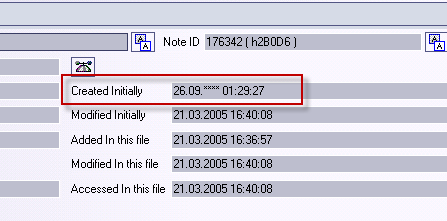
As you can see in the screenshot,  “Created Initially” has a suspect value. I deleted the document from the database and the error does not occur any longer.

UPDATE: Seems that this is a known issue in 7.0.3 and has been fixed with 7.0.3FP1 ( http://www.badkey.com/db/blogsphere.nsf/d6plinks/JWIE-7LJUXW ) but I am running Domino 8.5. So I will open a PMR with IBM support …


SnTT: Is database design hidden (Notes API Solution)

Bernd Hort posted a tipp earlier today on how to programmatically check is the design of a database is hidden. Bernd said that there is no method in LotusScript to do such.

I did a little research and found an older DominoPower article. In Notes 5 IBM introduced some enhancements to the Notesreplication class. Amongst other methods and properties there was a HideDesign property. Anybody knows what has happened to this property?

And I found some Notes API calls to do the trick. I modified the code and here is my solution on how to programmatically check a databases design flag.

Const APIModule = "NNOTES" ' Windows/32 only
Const REPLFLG_HIDDEN_DESIGN = &H0020

Type ReplicaInfo
	ID(1) As Long
	Flags As Integer
	CutoffDays As Integer
	CutoffDate(1) As Long
End Type

Declare Function NSFDbOpen Lib APIModule Alias "NSFDbOpen" _
( Byval P As String, H As Long) As Integer
Declare Function NSFDbClose Lib APIModule Alias "NSFDbClose" _
( Byval H As Long) As Integer
Declare Function OSPathNetConstruct Lib APIModule Alias "OSPathNetConstruct" _
( Byval Z As Long, Byval S As String, Byval F As String, Byval P As String) As Integer
Declare Function NSFDbReplicaInfoGet Lib APIModule Alias "NSFDbReplicaInfoGet" _
( Byval H As Long, R As ReplicaInfo) As Integer
Declare Function NSFDbReplicaInfoSet Lib APIModule Alias "NSFDbReplicaInfoSet" _
( Byval H As Long, R As ReplicaInfo) As Integer

Function IsDesignHidden ( db As NotesDatabase ) As Boolean
	IsDesignHidden = False
	Dim hDB As Long
	Dim R As ReplicaInfo	
	p$ = Space(256)
	OSPathNetConstruct 0, db.Server, db.FilePath, p$
	NSFDbOpen p$, hDB
	NSFDbReplicaInfoGet hDB, R
	If ( Not R.Flags  And REPLFLG_HIDDEN_DESIGN) = 0 Then
		IsDesignHidden = True
	End If
	NSFDbClose hDB
End Function

Now you can call the function. It will return true is design is hidden and false if the database has open design.

Sub Click(Source As Button)
	Dim session As New NotesSession
	Dim db As NotesDatabase
	Dim rep As NotesReplication
	Set db = session.CurrentDatabase
	Msgbox IsDesignHidden(db)
End Sub

Member Of GONAD

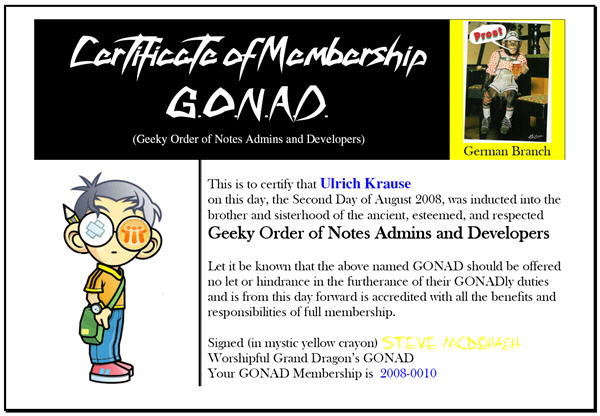
After all those endless nights in front of my computer trying to work around several pesky bugs and half baked functions in my beloved Lotus Notes; after uncounted server crashes and RSODs; after pilgramage to conferences, today I became a member of GONAD.

member of gonad

If you too want to become a member of GONAD, read Steve McDonagh’s post for furher information.


AutoPopulateGroup (If You Do Not Run Domino 8.5)

A few days ago, I wrote about a new feature of Domino 8.5 to automatically populate groups via a LDAP selectioncriteria. This is a great feature and I have successfully tested it on my sandbox server.
Since we run Domino 8.0.1 on our productive servers, we cannot use this very useful feature. …

But, with a few lines of JAVA and Lotusscript code, you can build your own solution to auto populate groups. Here is what I came out with.

I’ve created a subform with two fields and a button.
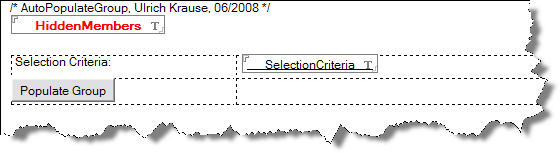
  • HiddenMembers, Text, hidden
  • SelectionCriteria, Text, editable

The “Populate Group” button contains the following code

'/* Declaration
Const fldMEMBERS = "Members"
Const fldHIDDEN = "HiddenMembers"
Const agntDOLDAP = "AutoPopulateGroup"

Sub Click(Source As Button)
	Dim s As New NotesSession
	Dim ws As New NotesUIWorkspace
	Dim db As NotesDatabase
	Dim agent As NotesAgent
	Dim doc As NotesDocument
	Dim uidoc As NotesUIDocument
	Dim searchResultItem As NotesItem
	Dim paramid As String 

	Set db = s.CurrentDatabase
	Set uidoc = ws.CurrentDocument
	Set doc = uidoc.Document
	Set agent = db.GetAgent(agntDOLDAP)
	Call doc.save(True, False)
	paramid = doc.NoteID
	Call agent.RunOnServer(paramid)
	Delete doc
	Set doc = db.GetDocumentByID(paramid) 

	Set searchResultItem = doc.getFirstItem(fldHIDDEN)
	Call uidoc.FieldSettext( fldMEMBERS,  "")
	Forall values In searchResultItem.Values
		Call uidoc.FieldAppendText(fldMEMBERS,  values)
		Call uidoc.FieldAppendText(fldMEMBERS, Chr(10))
	End Forall
	Call uidoc.Refresh
	doc.Remove(True)
End Sub

Like in Domino 8.5 you’ll have to run LDAP on your server. To access LDAP and do a search according to the SelectionCriteria, you need an agent with the following piece of Java code.

import lotus.domino.*;
import javax.naming.*;
import javax.naming.directory.*;
import java.util.Hashtable;
import java.util.Vector; 

public class LDAPSearchWithFilter extends AgentBase { 

	private static String fldTmpMembers = "HiddenMembers";

    	public void NotesMain() { 

    	try {
        Database _db;
        Document _doc;
        Session session = getSession();
        AgentContext agentContext = session.getAgentContext();
        _db = agentContext.getCurrentDatabase(); 

        Agent ag1 = agentContext.getCurrentAgent();
        String paramid = ag1.getParameterDocID();
        Document doc = _db.getDocumentByID(paramid); 

        String searchCriteria = doc.getItemValueString("SelectionCriteria"); 

        String ldapCF = "com.sun.jndi.ldap.LdapCtxFactory";
        String ldapURL = "ldap://localhost:389/";
        String ldapBaseDN = "";
        String ldapUserID = "";
        String ldapPassword = ""; 

        Hashtable env = new Hashtable(4);
        env.put(Context.INITIAL_CONTEXT_FACTORY, ldapCF);
        env.put(Context.PROVIDER_URL, ldapURL + ldapBaseDN);
        env.put(Context.SECURITY_PRINCIPAL, ldapUserID);
        env.put(Context.SECURITY_CREDENTIALS, ldapPassword); 

    try {
       	DirContext ctx = new InitialDirContext(env);
        	SearchControls ctls = new SearchControls();
		NamingEnumeration answer = ctx.search("", searchCriteria, ctls);
		PopulateGroup (answer, doc);
        	ctx.close(); 

	    		} catch(NamingException e) {
     	   		e.printStackTrace();
    		} 

	    } catch (Exception e) {
    		e.printStackTrace();
    }
} // end of Main 

public static void PopulateGroup(NamingEnumeration col, Document doc) { 

    try {
    Item item = doc.getFirstItem(fldTmpMembers);
    Vector v = new Vector();
    String result;    

	if (col.hasMore()) { 

        		while (col.hasMore()) {
            		SearchResult sr = (SearchResult)col.next();
            		result = (String)sr.getName();
                	v.addElement(result.replace(',','/'));
           	} // end of while

			doc.replaceItemValue(fldTmpMembers, v);
    			doc.save(true);
		}
    }
	catch (NamingException e) {
    		e.printStackTrace();
    		} catch (Exception e) {
    			e.printStackTrace();
    			}
	} // end of PopulateGroup
} // end of class

Set the agent’s runtime security to “2”, to allow restricted operations. When you have all code in place, you can test the function by typing a selection criteria and clicking the button.
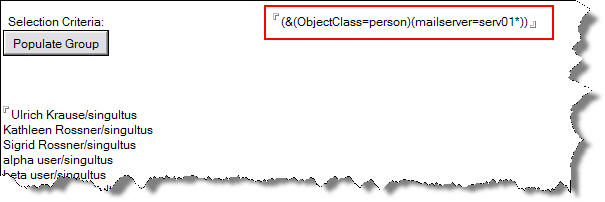
The members field in your form should now show all persons that have “serv01” as their mailserver.

Download sample database

Is User A Member Of A (Nested) Group ?

Working with nested groups, it can be hard to determine if a user is member of the “base” group. The following class contains a method to do the job.

IsGroupMember ( GroupName, UserName ) calls method ExplodeGroup, which fills an array with all members of the group. It also resolves nested groups.

IsGroupMember now checks if the username is a member of this array using Lotusscript function ArrayGetIndex.

Class NotesDominoDirectory

	Private strServer As String

	Public Sub new (server As String )
		strServer = server
	End Sub

	Public Function ExplodeGroup (GroupName As String) As Variant

		Dim s As New Notessession
		Dim db As New NotesDatabase ( Me.strServer, "names.nsf" )
		Dim doc As NotesDocument
		Dim view As NotesView
		Dim i As Integer, j As Integer, k As Integer
		Dim arrGrp1, arrGrp2 As Variant

		Set view=Db.GetView ("($VIMGroups)")
		Set doc=View.GetDocumentByKey (GroupName)
		Redim arrMembers (1) As Variant
		j = 0

		If Not (doc Is Nothing) Then
			arrGrp1= Doc.GetItemValue ("Members")
			For i= 0 To Ubound (arrGrp1)
				arrGrp2= Me.ExplodeGroup (arrGrp1 (i))
				Redim Preserve arrMembers (Ubound (arrGrp2) + j) As Variant
				For k= 0  To Ubound (arrGrp2)
					arrMembers (j) = arrGrp2 (k)
					j = j + 1
				Next
			Next
		Else
			Redim arrMembers (0) As Variant
			arrMembers (0) = GroupName
		End If

		ExplodeGroup= Arrayunique (arrMembers)

	End Function 

	Public Function IsGroupMember ( strGroup As String, strUser As String ) As Boolean

		IsGroupMember = False

		If (Arraygetindex (Me.ExplodeGroup (strGroup), strUser , 5))  Then
			IsGroupMember = True
		End If

	End Function

	Public Function IsGroupMemberExt ( strGroup As String, strUser As String ) As Boolean
		' uses undocumented function
		Dim arrMembers As Variant
		IsGroupMemberExt = False
		arrMembers =
            Evaluate(|@ExpandNameList("|& strServer & |":"names.nsf";"|& strGroup &|")| )
		If (Arraygetindex ( arrMembers, strUser, 5)) Then
			IsGroupMemberExt = True
		End If
	End Function

End Class

Here is a sample of how to check if Ulrich Krause is member of group “Everybody”

Sub Click(Source As Button)
	Dim res As Variant
	Dim dd As New NotesDominoDirectory ("serv01/singultus")
	Msgbox dd.IsGroupMember ( "Everybody" , "CN=Ulrich Krause/O=singultus")
End Sub

There is also an undocumented @formula @ExpandNameList to expand a group and all nested groups to all the names.

Function IsGroupMemberExt ( strGroup As String, strUser As String ) As Boolean
	' uses undocumented function
	Dim arrMembers As Variant
	IsGroupMemberExt = False
	arrMembers =
         Evaluate(|@ExpandNameList("|& strServer &|":"names.nsf";"|& strGroup &|")| )
	If (Arraygetindex ( arrMembers, strUser, 5))  Then
	     IsGroupMemberExt = True
	End If
End Function

Taking Notes Podcast Episode 64

After a long period of silence ( a month or so 🙂 ) Bruce Elgort and Julian Robichaux produced a new episode of the Taking Notes podcast.

Episode 64 covers everything about Lotus Connections 1.0, Quickr 8.0, Lotusphere 2008. It contains a UKLUG update with Warren Elsmore, Collaboration University, Sametime 7.5.1 CF1, The LotusViralMarketing blog and, an “Interface Matters” segment from Chris Blatnick.

So download episode 64 right now from here.