SNTT – Determine DAOS FolderSize and NLO Count

After we successfully implemented DAOS on our productive servers, I wanted to create some statistics on how the DAOS repository changes over the time.

I could not find any build in statistics, so I had to find a way to get the data I wanted to collect and build some nice looking charts and graphs from this data.

Lets say, we want to have a historical overview about how the DAOS repository ( i.e. the DAOS Base Directory ) changes in size due to prunes and adding new attachments and we want to know, how many files are stored in the base folder and all subfolders.

If you follow IBM’s recommondation, you have a seperate drive for your DAOS repository. Then you can create a statistic for this drive. But does this stat will show you, how many NLO files are stored on this drive? No!

If you have a DAOS repository on a  drive aside of other data, the drive statistic will not work well for you, because it does not show the data only for the DAOS repository.

Conclusion; we have too determine the DAOS folder size and the file count for the base folder and all subfolders.  I searched Google and found many, many solutions for this.

1. Lotusscript and WMI

Set objFSO = CreateObject("Scripting.FileSystemObject")
Set objFolder = objFSO.GetFolder("d:\DAOS")
strFolderSize = Cstr(objFolder.Size)

2. Java

import lotus.domino.*;
import java.io.File;
import org.apache.commons.io.FileUtils;

public class DAOSRepSize extends AgentBase {

	public void NotesMain() {

		try {
			Session session = getSession();
			AgentContext agentContext = session.getAgentContext();
        		String DAOSBaseFolder = "d:/DAOS";

			File f = new File(DAOSBaseFolder);
        		long size = FileUtils.sizeOfDirectory ( f );
			System.out.println("Size: " + size + " bytes");

		} catch(Exception e) {
			e.printStackTrace();
		}
	}
}

Both, Lotusscript + WMI and Java have the disadvantage, that you have to scan all subdirectories seperately. This is very time consuming and took about 1 hour on the live system.
So i tried another approach and finally found the/my solution:

3. Good old DIR and FIND commands

The DIR command combined with the /S parameter displays the content of a folder and all its subdirectories.

The DIR command creates somthing like this on the display; each subdirectory reports FileCount and Size and at the bottom you find a summary of all Files and its size.

10.03.2009 09:25 12.226 FE882EC6BCA2169B4D48B584
2E99.nlo
470 Datei(en) 352.749.584 Bytes

Anzahl der angezeigten Dateien:
470 Datei(en) 352.749.584 Bytes
5 Verzeichnis(se), 54.691.553.280 Bytes frei

You can use the output from the Dir /S as input for the FIND command.

C:\WINDOWS\system32\cmd.exe /C “dir D:\Programme\IBM\Lotus\Domino\data\DAOS /s | find /I “File(s)” > c:\temp\DAOS_SERV01_%Date%.txt”

This commandline creates a textfile with the following content:

0 File(s) 0 bytes
40000 File(s) 14.765.039.757 bytes
40000 File(s) 16.137.319.939 bytes
39982 File(s) 15.409.206.655 bytes
39977 File(s) 12.258.017.367 bytes
39981 File(s) 12.953.697.877 bytes
39911 File(s) 13.429.407.386 bytes
39998 File(s) 12.668.978.548 bytes
39918 File(s) 12.735.446.658 bytes
39939 File(s) 13.405.251.936 bytes
39999 File(s) 14.543.864.272 bytes
40000 File(s) 18.486.530.559 bytes
39997 File(s) 15.527.680.149 bytes
39990 File(s) 11.587.766.203 bytes
39975 File(s) 13.679.295.122 bytes
39984 File(s) 15.774.269.341 bytes
39990 File(s) 14.484.397.076 bytes
39937 File(s) 14.256.113.580 bytes
39999 File(s) 13.542.828.429 bytes
39998 File(s) 15.007.972.785 bytes
39885 File(s) 12.793.036.296 bytes
28249 File(s) 7.986.253.672 bytes
827709 File(s) 291.432.373.607 bytes

Where method 1 and 2 needed almost 1 hour to complete, the DOS commands only run 20 minutes. I run this command as a scheduled task at 1:00 am.

A small agent now reads the files and imports the data into a Notes database.

Sub Initialize
	Dim s As New NotesSession
	Dim db As NotesDatabase
	Dim doc As NotesDocument
	Dim item As NotesItem
	Dim fileNum As Integer
	Dim fileName As String
	Dim pathName As String
	Dim FilePattern As String
	Dim ServerName As String
	Dim FileDate As String
	Dim FileCount As String
	Dim DirSize As String
	Dim text As String
	Dim dummy As Variant

	Set db = s.CurrentDatabase

	pathName = "c:\temp\"
	FilePattern = "DAOS_*.txt"
	fileName = Dir$(pathName & FilePattern, 0)

	Do While fileName <> ""
		Msgbox filename
		dummy = Split(FileName,"_")
		ServerName = dummy(1)
		FileDate = Replace(dummy(2),".txt","")

		fileNum% = Freefile()
		Open PathName & fileName For Input As fileNum%

		Do Until Eof(1)
			Line Input #fileNum%, text
		Loop

		Set doc = db.CreateDocument
		dummy = Split ( Trim(text)," " )
		With doc
			.Form = "DAOS.Folder.Size"
			.FolderSize = Replace(dummy(2),".","")
			.CreatedBy = s.UserName
			.ServerName = ServerName
			.FileCount = dummy(0)
			.FileDate = FileDate
		End With
		Call doc.Save (False, False)		

		Close fileNum%
		Kill PathName & fileName
		fileName = Dir$()
	Loop

End Sub

Another agent which is invoked via a web browser will create a Line Chart. The agent uses Macromedia Fusion Charts.

Sub Initialize
	Dim s As New NotesSession
	Dim db As NotesDatabase
	Dim doc As NotesDocument
	Dim head As Variant
	Dim graph As Variant
	Dim i As Integer
	Dim v As NotesView
	Dim hSize As String
	Dim vSize As String
	Dim yAxisMinValue As String
	Dim yAxisMaxValue As String
	Dim xAxisName As String
	Dim caption As String

	hSize = "800"
	vSize = "600"

	caption = "DAOS"
	xAxisName ="Date"
	yAxisMinValue = "280000000000"
	yAxisMaxValue = "350000000000"

	Set db= s.CurrentDatabase
	Set v =db .GetView("DAOS.Folder.Size")

	head= _
	{}
	Print head
End Sub

Here is what you’ll see in the browser
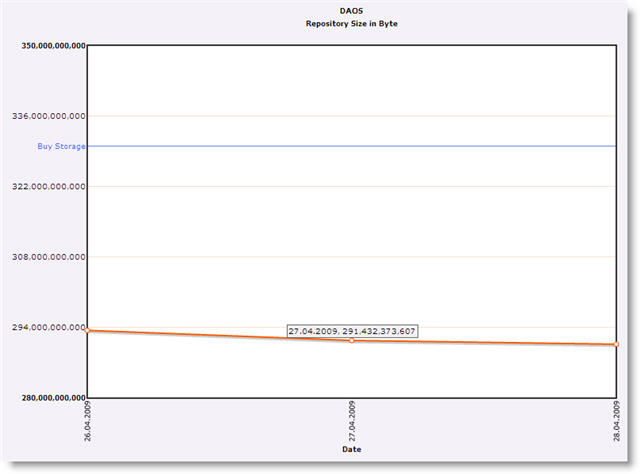
daosrepository

The chart shows, what the log file on the domino server does not shows.


LNT – Mails disappear from inbox

Recently I posted that an update for Lotus Notes Traveler is available. Today I saw that this fixpack  causes problems.

When you receive a new mail, this mail is synced to the device. When you open the mail on the device, there is no problem, except that the unread mark is not exchanged with your client and the mail remains unread in the client inbox.

But … when you open an uread mail in the Lotus Notes client, the mail disappears from the inbox on the device.

I reverted back to 8.5.0.1-LNT-LO37251 and the mails stay on the device when read in the Notes client.

Anyone else who can reproduce this behaviour?


Lotus Notes Traveler 8.5.0.1 Interim Fix LO39586

The Lotus Notes Traveler software offer quick email access, address book, to-do list and journal to supported mobile devices or gadgets. This program can be quite handy for individuals who manage a lot of information. For instance you’re in the middle of gathering data from Advantage One Insurance and you need to save and organize them electronically so you can move on to another task. The Lotus Notes Traveler software will be a good fix for this situation.

8.5.0.1 Interim Fix LO39586 is now available on Fix Central.

The fix includes the following APARs:

  • L039586 – Anniversary calendar entry can not start before 1975
  • LO37036 – Troubles downloading bootstrap.nts file from  WM ppc device.
  • LO37329 – Unknown timezone error message displayed on Domino console.
  • LO36583 – Can not access LotusTraveler.ntf on new install if server is not part of LocalDomainAdmins group.
  • LO37264 – Inbox email is resent to recipients from Traveler device.
  • LO39627 – SERVER CRASH AFTER UPGRADE FROM 8.0.1 TO 8.5
  • LO39628 – Mail Filter range not working correctly.
  • LO39629 – CONTACT NAME MODIFIED ON DEVICE, NOT CHANGED ON SERVER.
  • LO39630 – CONTACT PHOTO CORRUPTED IF CONTACT MODIFIED ON SERVER AND DEVICE

VMWare Server on Lenovo S10e

I recently installed VMWare Server 2.0.1 on my brand new Lenovo S10e. I do not use the VMs every day, so I thought it would be a good idea to save some ressources on the computer and do not start the VMWare services automatically when the system starts.

First of all, change all VMWare … services from automatic to manual start.

To make the process of manually starting / stopping of the necessary services comfortable, I created two .cmd files with the following contents.

VM.Start.cmd:

net start “VMWare Server Web Access”
net start “VMWare NAT Service”
net start “VMWare DHCP Service”
net start “VMWare Host Agent”

VM.Stop.cmd:

net stop”VMWare Server Web Access”
net stop”VMWare NAT Service”
net stop”VMWare DHCP Service”
net stop”VMWare Host Agent”
net stop”VMware Authorization Service””

There are 5 services to stop , but you only need to start 4 services. The VMWare Authorization Service is started automatically when the WMWare Host Agent comes up.


New Toy

s10eYesterday, my new toy, a Lenovo S10e arrived.
It has an Intel Atom 270 processor, 2GB Ram, 160GB HDD and a 10.2” display. The display has a resolution af 1024 by 576. This takes a lot of getting used to.

The OS is Windows XP Sp3. I installed Lotus Notes 8.5 Standard including Admin and Designer client.

I was surprised, how well Lotus Notes runs on this little calculator. Even the Designer opens my mailfile in less than 40 seconds.

The S10e battery runs for almost 5 h with WiFi enabled and a lot of HDD activity during installation and configuration.


DAOS – Where do these files come from?

Here is another issue I encountered on my travel to the DAOS universe.

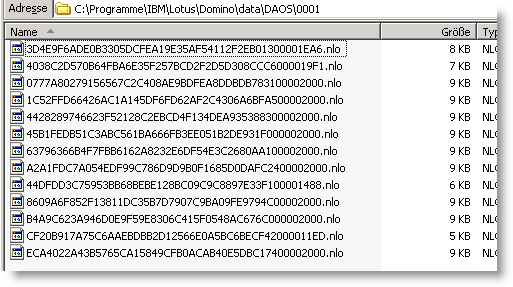
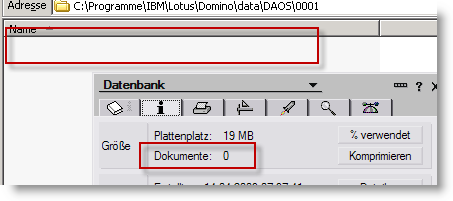
My mailfile is based on mail85.ntf. There are no documents in the database. The DAOS Dir does not contain any NLO files.

daostemplate2

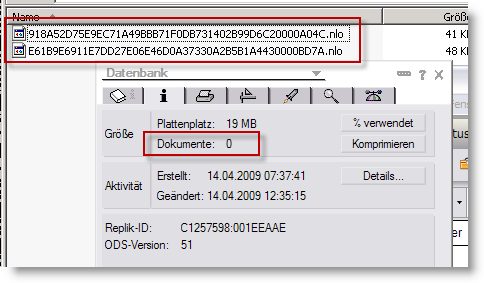
No surprise is that. Then I changed the template on the database to ONTF_dwa702. After the design has changed, I found 2 NLO files in the DAOS repository!!

daostemplate1

Again I changed the template and used a DWA 7.0.3 template. Now I saw this in the DAOS repository.

daostemplate3

Does somebody has any explaination ??


DAOS – Encrypted mail

Yesterday I wrote about how to waste space using the wrong compression settings. I a comment, Mohamed asked about encrypted mail.

I tested this in my demo environment. The result is a bit scary …

I have two users, ALPHA and BETA. ALPHA sends a mail to BETA with an attachment. The mail is encrypted when sent. BETA uses the same bitlike attachment and sends an encrypted mail to ALPHA.

Here is the result

daos6

One NLO for the mail stored in the sent view and one NLO for the file in the receiver’s inbox

Can this be correct or did I something wrong??

UPDATE: Encryption and the number of NLO’s ( Gary Rheaume )


DAOS – How to waste space

DAOS is a great space saver. We all know this. But if you do not read the DAOS documentation carefully, you can waste space. I am preparing a session for AdminCamp 2009 where I will talk about DAOS.When setting up the demo server for the presentation, I came across one important thing to watch when you setup DAOS on your server.

This is described in the administration help, but as we all know, nobody reads the help and this question will be asked in forums sooner or later.

Assume you have two databases on your server that are DAOS enabled. The DAOS directory does not contain any NLO files at this moment.

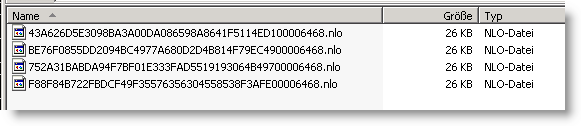
Now create one document in DB1 and another one in DB2. Attach the same file to both documents. What would you expect? Right. There should be only one NLO file in the DAOS directory.

But, look at this

daos1

How can this happen? Well the answer is easy. DB1 has LZ1 compression enabled in the database properties, DB2 does not.

And now, look at this

daos2

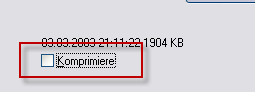
Huhh … This is what you get when you create another document in both databases but uncheck the “Compress” option on the “Select File” dialog.

daos3

So, when you setup DAOS in your environment, make sure that all databases involved support the same compression algorithm.

After recompressing both databases with “load compact -c -ZU …” we now have the expected result; 4 documents containing 4 bitlike attachments resulting in one single NLO file.

daos4


DAOS – Catalog needs re-sync on Domino startup

Whenever I start my Domino after a clean shutdown, the DAOS catalog needs to be re-synced.

I see the following message on the server console :

postponed

The behaviour is reproducable. I have done a fresh installation of Domino 8.5 on Windows 2003 server and configured the server for the first start. After the server has started successfully, I opened the server document in names.nsf and configured DAOS and transactional logging. I saved my settings and restarted the server by typing “restart server” on the console. The server came up and created the transaction logs. Then I restarted the server once again and from now on the message appears at every server start.

This seems to be the same as described here. Just wonder, if there is already a fix available.